
A few weeks ago, we introduced the first version of Semaphore’s MCP server; a new way for AI agents to access your CI/CD data directly from the source and opening the door to smarter automation, including self-healing pipelines. Today we announce three new features for AI-Driven CI/CD.
Since then, we’ve been hard at work expanding what the MCP server can do. Our goal is simple: make AI a natural part of your CI/CD workflow, whether you’re working from the terminal, your IDE, or alongside an AI assistant. Today, we’re releasing several new features that take us one step closer to fully AI-assisted CI/CD.
What’s New
This month’s update introduces three significant improvements to Semaphore’s AI ecosystem:
- Automatic Project Initialization: Setting up your AI agent to work with Semaphore just got dramatically easier. With a single command, your agent receives all the prompts, configuration files, and best practices it needs to integrate smoothly with your project.
- AI-Optimized Test Summaries: test-results can now create AI-optimized JSON summaries. These files are optimized for AI consumption, needing less context to achieve better results.
- Pipeline Rebuild Capabilities: The MCP server is no longer read-only. AI agents can now rerun complete workflows or start new ones.
Automatic MCP Setup
Once your MCP server is configured in the AI tool of your choice (in this example, Claude), you can initialize a project by running:
/semaphore mcp_setup my-project my-orgThe agent automatically generates and updates a set of project files, similar to how /init commands are used by agents to configure projects.
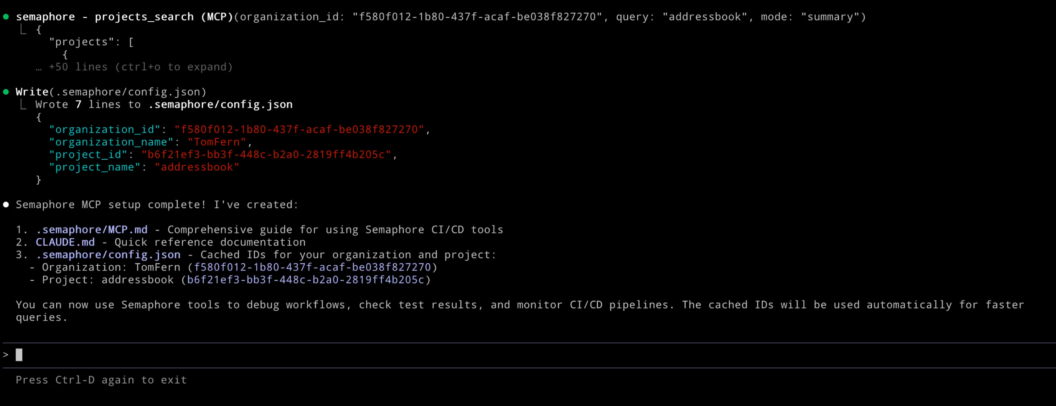
These files act as its “operating manual” for working with Semaphore:
CLAUDE.md: an instruction set that teaches Claude how to interact with Semaphore’s MCP server..semaphore/MCP.md: a reference of best practices and a full list of available MCP tools..semaphore/config.json: cached project information that helps reduce token usage and speed up interactions.
Together, these files allow your AI agent to understand your environment, navigate your pipelines, and perform tasks with significantly more accuracy.
AI-Optimized Test Results
In a previous demo, we showed how tools like GitHub Copilot can help automatically repair failed builds by analyzing your test output. It worked well for simple errors but since we used XML reports as context, the results were mixed for complex solutions.
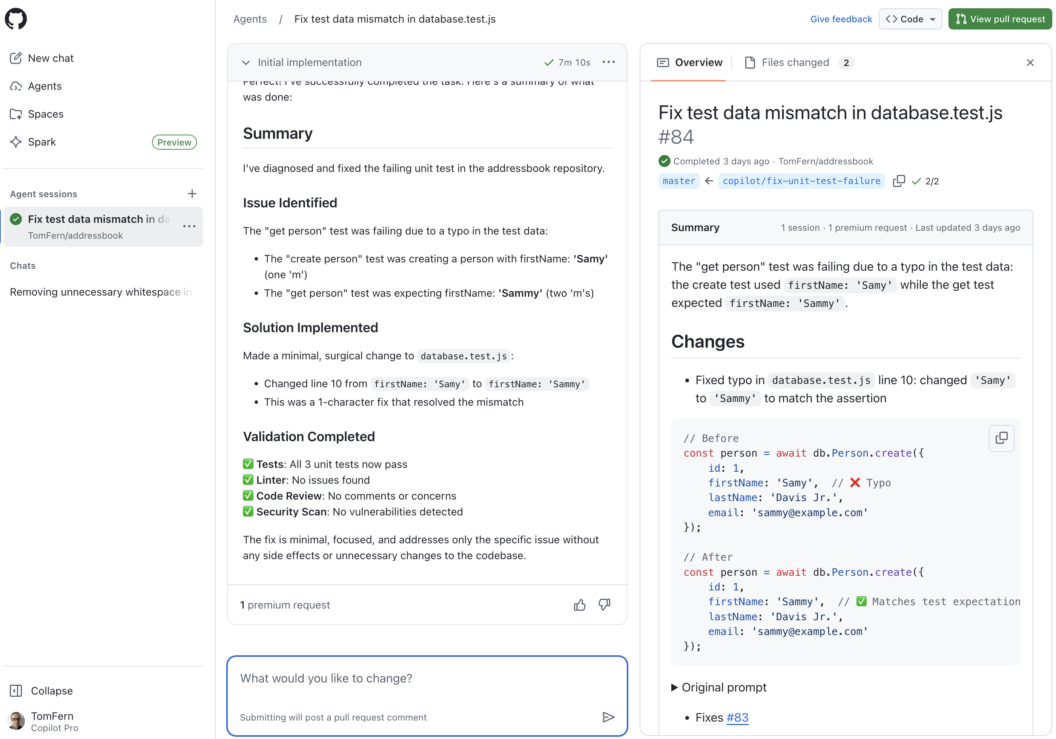
XML is no longer the only option. You can enable JSON summaries by adding --generate-mcp-summary to your test results command:
test-results publish --generate-mcp-summary junit.xmlThis attaches an AI-ready .json summary alongside your standard test artifacts. Any AI agent such as Copilot, Claude, or Codex can then use this structured data to produce more accurate diagnoses and more reliable repair suggestions using less tokens.
AI Agents Can Now Rebuild Pipelines
When we first introduced Semaphore’s MCP server, it offered read-only access to your CI/CD environment. AI agents could inspect pipelines, analyze artifacts, and help you understand failures but they couldn’t take direct action.
With this update, AI agents can rerun entire pipelines or selectively rebuild only failed jobs, giving them an active role in managing your CI/CD workflows.
This feature makes CI/CD more convenient and allows for more advanced automation. With rebuild capabilities in place, AI agents can begin to:
- Automatically retry flaky jobs
- Validate fixes they propose
- Respond programmatically to CI/CD events
- Help enforce build stability and quality
Conclusion
AI-assisted CI/CD is here to help how teams build, test, and ship software. We’re committed to building the best ecosystem for integrating AI into your workflows. More capabilities are on the way, and we’re excited to share what’s coming next.
Thank you for following along, and happy building!
Want to discuss this article? Join our Discord.