Semaphore Open Source 1.6: MCP Server, sem-ai Out of the Box, and Partial Job Reruns

The MCP server and sem-ai are coming to Semaphore open source. Version 1.6 arrives exactly one year after 1.5 and packages up around 494 pull requests of new capabilities, built over the past year and now shared with the community.

What Shipped

MCP server in the open source editions

The MCP server is now included in both the Community Edition and the Enterprise Edition of Semaphore open source. It’s part of a broader push this year to bring AI and automation tools into Semaphore.

sem-ai works out of the box

sem-ai is fully supported with no additional configuration necessary. It works with both service accounts and user tokens.

New public API endpoints

There are a lot of new public API endpoints, including endpoints for artifacts and for pre-flight checks in the Enterprise Edition. Artifacts are now supported through the REST API. The result: almost everything in Semaphore is now configurable from the API, either through sem-ai or through the regular API endpoints.

Partial job reruns

Long and complex pipelines no longer need a full rerun. With partial job reruns, not everything needs to be rerun now.

New filtering options in the UI

The UI gets new filtering options.

RustFS replaces MinIO for artifact storage

Semaphore previously used MinIO as its artifact storage engine. With MinIO moving away from the open source community, we switched to RustFS as the replacement. RustFS also powers our tests.

Security fixes and improvements

The release also includes a lot of security fixes and general improvements.

What’s Coming

The release candidate will be ready in the next couple of days, and it will include the extended changelog with the full list of changes.

As always, we accept PRs from the community. If you have comments or suggestions, open an issue or a PR on the Semaphore repository. All contributions and feedback are very welcome.

Pete Miloravac
Writen by:
Pete Miloravac is a software engineer and educator at Semaphore. He writes about CI/CD best practices, test automation, reproducible builds, and practical ways to help teams ship software faster and more reliably.

sem-ai 0.4.0: smaller responses, safer access, and pre-flight checks

AI coding agents work best when they receive the right information without unnecessary noise. They also need clearly defined permissions and reliable safeguards for the changes they make.

sem-ai 0.4.0 improves all three areas. The release introduces more compact pipeline responses, flexible context switching, and support for Semaphore pre-flight checks.

Watch Nick demonstrate the new capabilities in the latest Semaphore product news update.

Smaller responses with less context usage

Requests for Semaphore workflows and pipelines now return a much more compact response by default.

In the demonstration, the new format reduced the response size by approximately 99 percent compared with the previous full output. This gives coding agents the essential information while consuming far fewer context tokens.

The detailed output is still available when it is needed. You can also control the results by limiting the response or filtering pipelines by date.

The result is a more efficient default experience without removing access to the underlying information.

Switch between different Semaphore contexts

sem-ai 0.4.0 introduces a new context flag. This allows developers and AI agents to switch between Semaphore organizations, credentials, and service accounts.

Contexts can be selected through the command line flag or an environment variable.

This is particularly useful when different tasks require different permission levels. For example, you can create:

  • A read-only service account for reviewing code and investigating pipelines
  • A separate service account for changing Semaphore configuration
  • Different contexts for different organizations or environments

This makes it easier to follow least-privilege access principles while giving agents the information and capabilities required for a specific task.

Manage pre-flight checks through sem-ai

The release also adds access to Semaphore’s pre-flight checks API.

Pre-flight checks let teams evaluate a request before a workflow starts. They can enforce organizational rules such as branch naming conventions and prevent non-compliant changes from progressing through the pipeline.

During the demonstration, Claude Code used the Semaphore pre-flight skill to create a rule for the Calculator project. The rule accepted the main and master branches while requiring other branch names to follow the specified pattern.

Claude then tested the configuration against several branches. Builds from accepted branches continued, while branches that did not match the rule were blocked as expected.

This means developers can now ask their coding agent to create and validate pre-flight policies directly from their development environment.

One limitation remains. There is not yet a programmatic way to modify the init job configuration used by pre-flight checks. The Semaphore team plans to address this gap in a future update.

How to update

sem-ai 0.4.0 is available now.

Claude Code and Codex plugins are updated automatically. If you use the sem-ai CLI directly, the update currently requires a manual command. sem-ai will notify you when a newer version is available and show the command required to install it.

The team is also exploring automatic updates for future CLI releases.

Try sem-ai 0.4.0

This release gives AI coding agents smaller and more focused CI/CD responses, safer ways to work across permission levels, and another tool for enforcing delivery policies before a workflow begins.

Watch the complete demonstration above to see the new capabilities in action.

Explore sem-ai on GitHub

Pete Miloravac
Writen by:
Pete Miloravac is a software engineer and educator at Semaphore. He writes about CI/CD best practices, test automation, reproducible builds, and practical ways to help teams ship software faster and more reliably.

Making testing work better for AI driven development

AI agents can generate and modify code quickly. But when a test fails, speed is no longer enough. The agent needs enough context to understand what happened, why it happened, and whether the code or the test itself needs to change.

In our latest product update, Marko Gaćeša is joined by Semaphore engineers Nick and Marcos to discuss how we are making testing more useful for both developers and their AI agents.

Watch the product update below.

More complete test context

Test reports often lose useful information while translating results from different test runners into a common format. This can leave developers and AI agents without the context they need to interpret a failure.

We are exploring a more native approach. Instead of relying on one generic format for every test runner, Semaphore can collect richer information directly from each testing framework.

For some ecosystems, this means using the most detailed output already available. For others, it means building thin integrations that preserve the information produced by the test runner. Initial work includes support for frameworks such as xUnit and RSpec.

The goal is simple: provide concise test reports without discarding the details needed to diagnose a failure.

Smarter flaky test detection

Semaphore already helps teams identify flaky tests. However, the current detection rules can miss tests that behave inconsistently across branches or over a longer period.

We are working toward a signal based model for detecting flakiness. Events such as test reruns and changing results for the same commit can contribute to a flakiness score, with different signals receiving different weights.

When a test crosses a defined threshold, Semaphore could notify the team through the product, notifications, or webhooks. The score would also decrease over time when the test stops producing inconsistent results.

This approach should help teams catch persistent flaky tests without permanently labelling tests because of an isolated incident.

Running the tests that matter

Another area under investigation is the relationship between code changes and test coverage.

By using code graphs, Semaphore could identify which parts of a system are affected by a change and determine which tests should run. This work is still at an early research stage, but initial results across some technology stacks are promising.

More targeted test selection could shorten feedback loops while maintaining confidence that the relevant code has been tested.

Faster processing of large test reports

Large test reports can also be difficult to store, transfer, and process.

We are changing how these reports are represented internally by moving toward JSON Lines. In this format, each line can be parsed and processed independently. This should improve processing performance and make it easier to work with large result sets.

Why code maps matter

The team also discussed how code maps are already improving AI assisted development inside Semaphore.

Semaphore has a large codebase composed of many services, technologies, and languages. Code maps give agents a shared view of how requests, functions, services, and dependencies connect.

Nick and Marcos have found that this helps agents:

  • Locate the relevant part of the codebase faster
  • Understand paths across different services and languages
  • Work with shorter prompts
  • Use fewer tokens
  • Check existing context instead of guessing
  • Produce fewer hallucinations

A code map does not have to begin as a complex system. Marcos started with Markdown files organised like a small internal wiki. He then added more specialised tools as his needs developed.

What comes next

Testing will be a major focus for Semaphore over the coming months.

We are working to make richer test context, better flaky test detection, faster report processing, and more intelligent test selection easier to use with less manual configuration.

The aim is to make test information useful out of the box, not only for developers, but also for the AI agents increasingly participating in the software development lifecycle.

Watch the full video to hear directly from the team and see where this work is heading.

Pete Miloravac
Writen by:
Pete Miloravac is a software engineer and educator at Semaphore. He writes about CI/CD best practices, test automation, reproducible builds, and practical ways to help teams ship software faster and more reliably.

Rerun Only the Jobs That Failed

Your pipeline fails on one job, and until now you had to rebuild the entire block to recover. Not anymore. Semaphore now reruns only the jobs that actually failed, so you get feedback faster and pay less to get it.

What Shipped: Job Rerun

When a pipeline failed, the old behavior rebuilt every job inside the block that contained the failure. The passing jobs got rerun right alongside the failed one. That was useful, but it was also slower and more expensive than it needed to be.

The default behavior now changes. Instead of rebuilding the whole block, Semaphore rebuilds only the jobs that failed. Every other job in the block, along with jobs from earlier in the pipeline, is carried over and reused in the new pipeline.

The topology of your workflow stays intact, and only the new jobs are built. The savings are concrete. Old jobs that get carried over are excluded from your billable time, so a rerun costs you only the failed jobs, not the whole block. Faster turnaround on failures, lower cost per run. If you prefer the old behavior, it is still available.

We exposed a flag in the YAML called block rebuild that retains the full block rebuild when you want it. The default is the new, leaner path, and the escape hatch is there when you need it. sem-ai is already aware of the new behavior, so agents pick it up automatically and rerun the right way from the start.

What’s Coming

Job rerun is the first building block of what we are calling doubling down on CI for the second half of 2026.

The bigger question we are working through is what CI looks like in an agent-driven software development world. sem-ai was our first step as the agent-native interface to the CI, and this is the next piece.

Through September we will be announcing more capabilities aimed squarely at agentic CI use. More detail on each as it lands.

Pete Miloravac
Writen by:
Pete Miloravac is a software engineer and educator at Semaphore. He writes about CI/CD best practices, test automation, reproducible builds, and practical ways to help teams ship software faster and more reliably.

Announcement: Xcode16 Deprecation in Semaphore

MacOS Xcode16 reached the end of its supported lifecycle on Semaphore. To ensure the security, reliability, and maintainability of our platform, we are announcing the deprecation and end of life of MacOS Xcode16 build environments.

Semaphore users should switch to Xcode26.

Why We’re Deprecating Xcode16

As operating systems age, they cease to receive timely security updates and ecosystem support. Continuing to run CI workloads on deprecated operating systems increases operational risk and limits our ability to ship improvements.

Deprecation Timeline

We will gradually phase out Xcode16 using a series of brownout periods. During these windows, jobs configured to run on Xcode16 will temporarily fail to start. This is intentional and designed to help you detect remaining usage before final removal.

First Brownout Period

September 7 – 13, 2026 Jobs running on macos-xcode16 will not start for 15 minutes during the following times:

  • UTC 10:00 – 10:15
  • UTC 13:00 – 13:15
  • UTC 16:00 – 16:15
  • UTC 19:00 – 19:15
  • UTC 22:00 – 22:15

Second Brownout Period

September 14 – 20, 2026 Jobs running on macos-xcode16 will not start for 30 minutes during the following times:

  • UTC 10:00 – 10:30
  • UTC 13:00 – 13:30
  • UTC 16:00 – 16:30
  • UTC 19:00 – 19:30
  • UTC 22:00 – 22:30

Third Brownout Period

September 21 – 27, 2026 Jobs running on macos-xcode16 will not start for 60 minutes during the following times:

  • UTC 10:00 – 11:00
  • UTC 13:00 – 14:00
  • UTC 16:00 – 17:00
  • UTC 19:00 – 20:00
  • UTC 22:00 – 23:00

Fourth Brownout Period

September 28 – October 4, 2026 Jobs running on macos-xcode16 will not start for 2 hours during the following times:

  • UTC 10:00 – 12:00
  • UTC 13:00 – 15:00
  • UTC 16:00 – 18:00
  • UTC 19:00 – 21:00
  • UTC 22:00 – 24:00

End of Life

Starting October 5th, 2026, Xcode16 build environments will reach end of life on Semaphore and will no longer be available.

At this point:

  • Jobs configured to run on macos-xcode16 will no longer start;
  • The macos-xcode16 image will be fully removed from the platform.

What You Need to Do

To avoid any disruption, update your pipelines to use a supported Xcode version as soon as possible.

  1. Identify Usage: check your Semaphore configuration files for references to Xcode16 (for example, macos-xcode16), including all YAML files and init-jobs.
  2. Migrate to a Supported Xcode Version: you must migrate to macos-xcode26 to ensure you are using the latest version available.
  3. Validate Your Pipelines: run your pipelines after upgrading to ensure all dependencies and scripts work correctly on the new environment.

Need Help?

If you have questions or run into issues while migrating, please reach out to Semaphore support or consult our documentation. We strongly encourage completing your migration before the first brownout period begins in September 2026.

Thank you for helping us keep Semaphore secure, stable, and up to date.

Pete Miloravac
Writen by:
Pete Miloravac is a software engineer and educator at Semaphore. He writes about CI/CD best practices, test automation, reproducible builds, and practical ways to help teams ship software faster and more reliably.

Best CircleCI alternatives in 2026

Teams looking for CircleCI alternatives are rarely replacing a single feature. They are reassessing build speed, unit economics, support coverage, deployment control, and how easily their CI/CD system fits the source-control platform they already use. CircleCI remains a capable hosted CI/CD product, but its credit-based model meters active users, compute by resource class and minute, add-ons, and certain network/storage usage, according to CircleCI pricing. That combination can be a reasonable fit—yet it also makes a disciplined comparison worthwhile as delivery volume grows.

This guide compares four practical CircleCI alternatives for 2026: Semaphore, GitHub Actions, GitLab CI/CD, and Buildkite. It focuses on verifiable product documentation, current pricing pages, and recent community reports rather than generic feature checklists.

TL;DR:

  • Choose Semaphore when you want a standalone CI/CD platform with a published usage model, cloud or self-hosted deployment options, modular support, and an emerging agent-native workflow.
  • Choose GitHub Actions when GitHub is your development hub;
  • GitLab CI/CD when you want CI/CD inside a broader GitLab DevSecOps platform;
  • and Buildkite when you want to run execution primarily on your own infrastructure while retaining a managed control plane.

Why teams evaluate CircleCI alternatives

CircleCI’s strengths are real: it offers cloud executors, self-hosted runners, high-concurrency options, and a mature integration ecosystem. Its Free tier includes 30,000 credits per month and up to 6,000 build minutes; its Performance tier starts at $15 per month and raises concurrency to 80 jobs, while Scale is custom priced, according to CircleCI pricing. Existing pipelines, team familiarity, and carefully tuned parallelism are meaningful switching costs.

Still, three evaluation triggers show up repeatedly:

  1. Cost predictability. Credits are consumed by active users, compute time, add-ons, and some overages—not simply a flat “minutes used” line item, according to CircleCI pricing. For example, Docker Layer Caching is billed at 200 credits per job, and storage/network usage can introduce additional metering, as described in CircleCI storage and caching documentation. That is not inherently a flaw, but it requires ongoing finance and platform visibility. Teams that want a cleaner compute-first model often compare CircleCI alternatives before their pipeline estate expands.
  2. Reliability and image currency. Community reports are not representative performance studies, but they are useful signals to investigate. In a July 2026 CircleCI Discuss post, a user reported that some of six parallel runners on main were being cancelled and marked “Failed/Failing,” despite no timeouts and with auto-cancel not expected to apply; the thread had no reply when checked in the July 2026 CircleCI Discuss post. In a separate May 2026 thread, a user questioned why Ubuntu machine image tags appeared not to have updated since September 2025; a CircleCI employee later confirmed new 2026 images and said update intervals can vary with testing and image payloads in the May 2026 CircleCI Discuss thread. These are individual reports, not proof of systemic defects. They do, however, make sensible due-diligence questions: What happens during runner failures? How current are your pinned images? What support path applies at your plan level?
  3. Platform fit. CI/CD is increasingly tied to the surrounding developer platform. A GitHub-centered team may value native workflow automation and GitHub’s marketplace ecosystem; a GitLab-centered team may prefer a shared repository, security, and CI/CD model. Conversely, teams that want vendor-neutral CI/CD, self-hosted execution, or more explicit support choices may look beyond the incumbent.

CircleCI alternatives at a glance

PlatformBest forDeployment/execution modelPublished entry pricing snapshotImportant trade-off
SemaphoreTeams prioritizing fast feedback, choice of cloud or self-hosted execution, and modular supportCloud-hosted and self-hosted agents; Community Edition is available for self-hosting$15 monthly usage credit; Ubuntu x64 2 vCPU listed at $0.0075/min on Semaphore pricingBenchmark comparisons must be read with hardware and workload context
GitHub ActionsTeams whose code, reviews, and governance already live in GitHubGitHub-hosted or self-hosted runners; ARC can orchestrate self-hosted runners on KubernetesPublic repositories get standard hosted-runner minutes free; Linux 2-core x64 is listed at $0.006/min beyond included usage in GitHub Actions billingStrongest fit is the GitHub ecosystem, not necessarily heterogeneous tooling
GitLab CI/CDGitLab teams seeking an integrated DevSecOps platformGitLab.com hosted runners or self-managed runnersFree includes 400 compute minutes/month; Premium is $29/user/month annually with 10,000 minutes/month in GitLab pricingBroader platform scope can be more than a team needs
BuildkiteTeams that want execution control on their own infrastructureManaged platform with self-hosted agents; hosted agents also availablePro is $30 per active user/month; 10 self-hosted agents included, then $3.50 per active agent/month in Buildkite pricingYou retain more infrastructure responsibility

1. Semaphore: best overall for transparent CI/CD economics and deployment choice

Semaphore is our top pick among CircleCI alternatives for teams that need a focused CI/CD platform rather than a source-control suite, and that want a clear route between hosted and self-hosted execution. Its pricing page publishes per-minute infrastructure rates, a $15 monthly usage credit, included concurrency, and separate storage/egress terms in Semaphore pricing. Teams can run jobs on Semaphore-hosted infrastructure or use self-hosted agents; Semaphore Community Edition is also available for organizations that need to operate the platform in their own environment through the Semaphore Community Edition repository.

Speed and cost: read the benchmark, not just the headline

Semaphore published a March 2026 benchmark (updated May 2026) using a warmed-cache Redmine test workload: checkout, dependency installation, PostgreSQL setup, and the full test suite, repeated ten times without outlier removal, as described in Semaphore’s published benchmark. In that vendor-run test, Semaphore averaged 5:01 and $0.04 per job, compared with CircleCI at 13:18 and $0.08 per job, according to Semaphore’s published benchmark.

The caveat belongs beside the result: these were not memory-identical configurations. Semaphore used a 2 vCPU, 8 GB f1-standard-2 machine, while CircleCI used a 2 vCPU, 4 GB Docker Medium machine in Semaphore’s published benchmark Treat the result as a useful published workload test—not a universal promise. A serious evaluation should recreate a representative pipeline using comparable CPU, memory, cache state, concurrency, network, and test characteristics.

Agent-native capability, cautiously stated

Semaphore has been introducing sem-ai, an agent-oriented CI/CD experience. Its published material describes a local MCP server through which coding assistants can retrieve pipeline context and diagnostics in Semaphore’s sem-ai announcement plus contextual skills and commands intended to improve workflow setup and debugging in Semaphore’s sem-ai workflow article. This is promising for teams experimenting with agent-assisted engineering, but it should be evaluated in a proof of concept: confirm availability in your plan and deployment model, security boundaries, agent permissions, auditability, and how reliably suggestions work on your own failure modes. Do not select a CI/CD platform solely on an emerging AI feature.

Support without an opaque enterprise jump

Another differentiator is published modular support. Semaphore lists Basic at $50/month, Priority Response at $250/month, SLA Standard at $500/month (P1 response within four hours), and SLA Premium at $750/month (P1 response within one hour, with optional 24/7 coverage), according to Semaphore pricing. That makes it possible to scope response coverage separately from compute. Compare those terms carefully with your required incident definitions, time zone, and escalation process.

Choose Semaphore if: you want a standalone CI/CD layer, want to retain a self-hosting path, need published support options, or want to pilot agent-native operations without moving your repositories.

2. GitHub Actions: best for GitHub-native delivery workflows

GitHub Actions is the most natural alternative for teams deeply invested in GitHub. It automates workflows inside repositories, supports reusable custom actions, and offers GitHub-hosted as well as self-hosted runners in GitHub Actions documentation. For organizations that operate runners on Kubernetes, Actions Runner Controller provides a Kubernetes operator for orchestrating and scaling self-hosted runners in the Actions Runner Controller documentation.

Billing is comparatively familiar to GitHub customers: standard GitHub-hosted minutes are free for public repositories, while private-account allowances vary by plan. GitHub lists Linux 2-core x64 at $0.006 per minute after included usage, with different rates for Windows, macOS, ARM, and larger runners.GitHub Actions billing documentation. Self-hosted runner use is free from GitHub Actions billing, though infrastructure, operations, and security remain your responsibility, according to GitHub Actions billing documentation

Choose GitHub Actions if: GitHub is already the control center for your engineers, the Marketplace covers most required integrations, and keeping code, pull-request events, workflows, and governance in one product matters more than adopting a dedicated CI/CD specialist.

3. GitLab CI/CD: best for teams standardizing on the GitLab platform

GitLab CI/CD is a strong choice for organizations already using GitLab’s repository and DevSecOps platform. Pipelines are configured in .gitlab-ci.yml, composed of stages and jobs, and can run on GitLab.com hosted runners or self-managed runners in GitLab CI/CD documentation. GitLab also supports reusable CI/CD components and a catalog, which can help platform teams standardize common configurations through GitLab CI/CD components documentation.

The current GitLab.com pricing page lists Free with 400 compute minutes per month, Premium at $29 per user/month billed annually with 10,000 compute minutes/month, and Ultimate at custom pricing with 50,000 compute minutes/month, according to GitLab pricing. Additional compute minutes are listed at $10 per 1,000 minutes in GitLab compute-minute documentation.

Choose GitLab CI/CD if: consolidating CI/CD with GitLab’s source code, security, planning, and governance workflows outweighs the appeal of a best-of-breed CI/CD product. Validate compute-minute cost factors and runner sizing against your actual operating systems before committing.

4. Buildkite: best for infrastructure-controlled, hybrid CI/CD

Buildkite separates a managed platform from execution on agents you control, which is attractive to organizations with specialized networks, compliance boundaries, or unusual build environments. It also offers hosted Linux and Mac agents, according to Buildkite pricing. Buildkite says self-hosted agent concurrency is not capped by the platform, while its billing uses a 95th-percentile approach for self-hosted agent counts, discarding the highest 5% of daily peaks, as described in Buildkite self-hosted agent documentation.

Its Personal plan is free for one user and includes 500 monthly minutes of Small Linux hosted agents; Pro is $30 per active user/month and includes 10 self-hosted agents plus 4,000 Linux vCPU minutes/month, according to Buildkite pricing. This can be compelling where control is central, but the team should budget for agent fleet operations, scaling, hardening, patching, and observability.

Choose Buildkite if: your engineering organization explicitly wants to own execution infrastructure and has the platform capacity to do it well.

When CircleCI is still a good fit

A list of CircleCI alternatives should not imply that migration is always the right answer. Keep CircleCI when its existing configuration is stable, the team is productive with its integration patterns, and the effective cost is understood from real usage—not assumed from a competitor’s pricing page. It remains particularly reasonable for teams using its parallelism model, resource classes, and existing setup successfully.

It may also be the safer short-term option if a migration would interrupt critical delivery work. First collect 60–90 days of actual usage: credits by compute class, active user count, Docker Layer Caching use, storage/network charges, failure and queue patterns, and support-ticket experience. Then compare that baseline to a small representative proof of concept on one or two CircleCI alternatives.

How to select among CircleCI alternatives

Use a short, evidence-based pilot rather than a feature scorecard alone:

  1. Choose representative workloads. Include a fast pull-request check, a cache-heavy build, integration tests, a deployment workflow, and any macOS/Windows/ARM requirement.
  2. Normalize the test. Match CPU, memory, cache state, database services, parallelism, and retry logic. Record queue time separately from run time.
  3. Measure total cost. Include compute, storage, egress, add-ons, user licensing, support, and the labor needed to run self-hosted infrastructure.
  4. Test operational response. Simulate a flaky test, a blocked deployment, and an expired credential. Check logs, access control, audit trails, and escalation response.
  5. Evaluate migration effort. Inventory environment variables, secrets, reusable components, status checks, branch protections, and deployment integrations before declaring a “simple YAML migration.”

FAQs about CircleCI alternatives

What are the best CircleCI alternatives in 2026?

The best CircleCI alternatives depend on your operating model. Semaphore is a strong dedicated CI/CD choice with cloud or self-hosted execution and published modular support; GitHub Actions is ideal for GitHub-native teams; GitLab CI/CD fits GitLab platform users; and Buildkite suits teams that want to control execution infrastructure, as outlined in Semaphore pricing.

Is Semaphore cheaper than CircleCI?

Semaphore’s vendor-published Redmine benchmark reported $0.04 per job versus CircleCI’s $0.08, but that test used 8 GB on Semaphore versus 4 GB on CircleCI, so it is not a like-for-like universal cost claim in Semaphore’s published benchmark. Run your own normalized workload before deciding.

Can I use self-hosted runners with these CircleCI alternatives?

Yes. GitHub supports self-hosted runners and ARC; GitLab supports self-managed runners; Buildkite’s model centers on self-hosted agents; and Semaphore offers self-hosted agents and Community Edition for self-hosting through Actions Runner Controller, GitLab self-managed runners, Buildkite self-hosted agents, and Semaphore Community Edition..

Are CircleCI alternatives difficult to migrate to?

Difficulty depends on configuration complexity, not just YAML syntax. Assess secrets, environment parity, orbs/actions/components, caches, service containers, status checks, and deployment integrations. Pilot one representative pipeline before moving a portfolio.

Which CircleCI alternative has the most transparent support pricing?

Semaphore publishes Basic ($50/month), Priority Response ($250/month), SLA Standard ($500/month), and SLA Premium ($750/month) support tiers and their stated response targets in Semaphore pricing. Still, verify coverage and terms against your own incident requirements.

Do CircleCI alternatives offer AI or agent-assisted CI/CD?

Vendors are adding AI-related capabilities. Semaphore’s sem-ai materials describe an agent-oriented experience using a local MCP server and contextual skills, but teams should validate controls, availability, and operational value in a real proof of concept rather than rely on marketing claims in Semaphore’s sem-ai announcement and Semaphore’s sem-ai workflow article.

The next step: validate with your pipelines

The right choice is the platform that improves delivery feedback and operational confidence for your own workloads—not the one with the most attractive generic comparison chart. Start a controlled pilot, retain the evidence, and choose on measured build time, total operating cost, migration effort, and support fit.

If Semaphore matches your requirements, create a free account. New accounts receive a $15 monthly usage credit, making it practical to test a representative pipeline before you commit; see Semaphore pricing.

Pete Miloravac
Writen by:
Pete Miloravac is a software engineer and educator at Semaphore. He writes about CI/CD best practices, test automation, reproducible builds, and practical ways to help teams ship software faster and more reliably.

Best GitLab Alternatives in 2026

GitLab is a capable, integrated DevSecOps platform—but it is not the only sensible way to run CI/CD. Teams comparing GitLab alternatives are often trying to improve pipeline execution, simplify operations, get clearer support and cost options, or adopt a CI/CD tool that fits their existing source-control strategy. That does not automatically mean moving repositories out of GitLab.

This guide compares four GitLab alternatives for a CI/CD-first decision: Semaphore, GitHub Actions, CircleCI, and Buildkite. It focuses on execution, deployment, pricing mechanics, support visibility, and where each choice fits—not on declaring one platform universally better.

TL;DR:

  • Choose Semaphore if you want a CI/CD-focused platform with managed cloud, self-hosted open-source, and behind-firewall enterprise deployment choices; published support/SLA tiers; and an early agent-native workflow.
  • Choose GitHub Actions when source code already lives on GitHub.
  • Choose CircleCI for high concurrency and a broad executor menu.
  • Choose Buildkite when a platform team wants to operate its own build fleet.
  • Keep GitLab when a unified GitLab source-control, CI/CD, security, and governance environment is the priority.

Why teams look for GitLab alternatives

GitLab CI/CD is part of a broader platform spanning planning, source code, CI/CD, security, release, and monitoring. Pipelines are defined in a root .gitlab-ci.yml file, broken into stages and jobs, and executed by GitLab Runners. GitLab offers Free, Premium, and Ultimate plans across GitLab.com, Self-Managed, and Dedicated deployments (GitLab CI/CD documentation) (GitLab pricing).

That breadth is valuable for teams that want one vendor and one workflow. It also means that a team evaluating GitLab alternatives should first decide whether its need is really “replace GitLab” or more narrowly “change CI/CD execution while retaining GitLab repositories and merge requests.” The latter is often the more practical question.

Three recurring evaluation triggers are worth separating from blanket criticism:

  • Usage and runner economics. GitLab.com’s Free plan includes 400 compute minutes monthly, Premium includes 10,000, and Ultimate includes 50,000; additional compute is listed at $10 per 1,000 minutes. Consumption is adjusted by machine cost factor, so a larger runner can consume quota faster than a small Linux runner. For example, GitLab documents factors from 1 for Linux x86-64 small to 12 for 2xlarge (GitLab pricing) (GitLab compute-minute documentation).
  • Operational responsibility. GitLab allows teams to bring their own runners on all plans. That can be the right control model, but self-managed CI also means owning infrastructure, runner maintenance, networking, caches, and security decisions (GitLab pricing) (GitLab compute-minute documentation).
  • Occasional execution or configuration friction. These are anecdotes, not prevalence statistics: a May 2026 GitLab Forum report described GitLab.com shared-runner egress to api.nuget.org hanging for roughly 10 minutes before failure; a July 2026 Free-tier report described pipelines stuck in created or canceling; and a self-managed user reported a runner networking failure during checkout (May 2026 GitLab Forum report) (July 2026 GitLab Forum report) (GitLab Runner networking report).

None of those points proves GitLab is slow, unreliable, or expensive for every organization. They explain why some teams benchmark their own workloads and review whether a CI/CD specialist better fits their operating model.

GitLab alternatives at a glance

PlatformBest forDeployment / execution modelPublished billing signalSupport visibilityMain trade-off
SemaphoreCI/CD-first teams seeking speed, deployment choice, and early agent-native workflowsManaged Cloud; self-hosted open-source CE; behind-firewall EnterpriseCloud compute from $0.0075/min; $15 monthly creditModular tiers published from $50/moBenchmark is vendor-published; evaluate on your workload
GitHub ActionsTeams already standardized on GitHubGitHub-hosted or self-hosted runnersStandard Linux x64 2-core overage $0.006/minDepends on GitHub plan/support setupDeeply tied to GitHub ecosystem
CircleCIHigh-concurrency CI and broad executor needsCloud plus self-hosted runnersCredit-based pricing; Performance from $15/moEnterprise details require sales engagementCredits/resource classes need careful modeling
BuildkitePlatform teams controlling build infrastructureSelf-hosted agents or hosted agentsPro $30/active user/mo; hosted Linux from $0.004/vCPU-minPlan-specificTeam operates more of the fleet with self-hosted agents

The comparison draws on Semaphore pricing and deployment documentation, GitHub Actions billing and runner documentation, CircleCI pricing and runner documentation, and Buildkite pricing and agent documentation.

1. Semaphore — best GitLab alternative for CI-first and agent-native workflows

Semaphore ranks first among these GitLab alternatives for teams that want a focused CI/CD operating model without giving up deployment choice. It is particularly relevant when the goal is to change the execution layer—not make an all-or-nothing source-control migration.

Compare real workloads, not slogans

Semaphore’s published benchmark measured a Redmine Rails workload over 10 warmed-cache, single-job runs. It reported Semaphore at 5 minutes 1 second and $0.04 per job, compared with GitLab at 11 minutes 15 seconds and $0.11 per job on close available 2-vCPU tiers (Semaphore benchmark methodology).

That is useful directional evidence, not a universal performance or cost guarantee. The result is a Semaphore-published test of one application and configuration; hardware was close rather than identical, the run was single-job rather than parallelized, and workload, caching, runner size, region, and dependency profile can materially change outcomes. Treat it as a reason to run a representative proof of concept, not a promise.

Choose cloud, open-source self-hosting, or enterprise control

Semaphore Cloud is managed. Semaphore Community Edition (CE) is free, open source under Apache 2.0, and designed for customer-hosted operation; its architecture uses a control plane and job-running agents, which teams can add to increase capacity or support architectures. Semaphore Enterprise Edition can be deployed on customer infrastructure behind a firewall (Semaphore CE documentation) (Semaphore CE source repository).

That creates a meaningful choice for teams that need managed CI/CD today but may require control over data or infrastructure later. It should not be mistaken for a claim that Semaphore duplicates every GitLab security, governance, or portfolio-management capability.

Make support terms easier to inspect

Semaphore publishes both compute and modular support options. Its pricing page lists Cloud Ubuntu x64 compute from $0.0075 per minute, self-hosted-machine execution at $0.0025 per minute, and a $15 monthly usage credit. It also lists Basic at $50/month, Priority Response at $250/month, SLA Standard at $500/month with a P1 response target of four hours, and SLA Premium at $750/month with a P1 response target of one hour; 24/7 coverage is optional on the premium tier (Semaphore pricing).

Published prices do not eliminate the need to confirm terms, coverage, and workload assumptions with the vendor. They do, however, give procurement and engineering a visible starting point when comparing GitLab alternatives.

Consider sem-ai carefully

Semaphore introduced an open-source CLI and agent interface in May 2026 for AI-assisted CI/CD work with Claude Code, Cursor, and Codex through MCP. The release describes access to structured pipeline and failure data, critical-path and blast-radius analysis, and ephemeral remote machines (Semaphore agent interface announcement).

This is an early agent-native capability, not a reason to assume autonomous remediation will be right for every production environment. Teams should validate governance, permissions, human review points, and the maturity of the integrations for their own coding-agent workflow. Semaphore’s product materials also identify additional integrations and workflows as future work (Semaphore agent interface announcement) (Semaphore sem-ai roadmap article).

Choose Semaphore when: your evaluation is primarily about CI/CD execution speed, cost transparency, deployment flexibility, support clarity, or experimenting with structured agent workflows—while retaining the option to keep GitLab as source control.

2. GitHub Actions — best for GitHub-native teams

GitHub Actions is a natural alternative when repositories, pull requests, permissions, and developer habits already sit in GitHub. It supports both GitHub-hosted and self-hosted runners. GitHub lists 2,000 monthly minutes for private repositories on Free, 3,000 on Team, and 50,000 on Enterprise Cloud; standard 2-core Linux x64 overage is listed at $0.006 per minute (GitHub Actions billing documentation).

Self-hosted runner execution is not billed through GitHub Actions metering, but GitHub makes clear that teams then provide and maintain the machines, operating systems, updates, and runners (GitHub self-hosted runner documentation).

Choose GitHub Actions when: the main objective is to consolidate a GitHub-centric delivery workflow. It is usually a better ecosystem fit than a generic “switch CI providers” decision. For a GitLab-centric source-control organization, factor in the workflow and migration cost rather than comparing only per-minute rates.

3. CircleCI — best for high-concurrency CI

CircleCI is worth considering for teams with demanding parallel workloads or executor requirements. Its Free plan lists 30,000 credits per month, approximately 6,000 build minutes, 30x concurrency, and support for Docker, Windows, Linux, Arm, and self-hosted runners. The Performance plan starts at $15 per month and lists 80x concurrency; Scale is annual/custom (CircleCI pricing).

The important evaluation detail is pricing mechanics: CircleCI uses credits and resource-specific rates. A direct price comparison therefore requires modeling the exact executor, resource class, storage, and concurrency profile—not just comparing a headline plan price. Its container runner runs in Kubernetes, while machine runner supports Linux, macOS, and Windows; self-hosted infrastructure remains the customer’s responsibility (CircleCI pricing) (CircleCI runner documentation).

Choose CircleCI when: high concurrency or a broad executor catalog outweighs the desire for the simplest billing model. Test your jobs against the exact resource classes you expect to use.

4. Buildkite — best for teams that want to control the build fleet

Buildkite is a strong fit for mature platform teams that want workers in their own networks and are prepared to own the operational layer. Buildkite Pro is listed at $30 per active user per month and includes 10 self-hosted agents; additional self-hosted agents are listed at $3.50 each per month. Hosted Linux compute starts at $0.004 per vCPU-minute, or $0.008 per minute for a 2-vCPU small machine (Buildkite pricing).

Buildkite agents poll over HTTPS and can run across isolated networks. That flexibility is useful for security boundaries and bespoke environments, but documentation also makes clear that self-hosted users provision, scale, and maintain infrastructure, agent updates, Docker, and cache storage. Hosted agents shift more of that burden to Buildkite (Buildkite agent documentation).

Choose Buildkite when: platform engineering wants maximum infrastructure control and has the operational capacity to manage it. If the goal is reducing runner operations, prioritize a managed option instead.

When GitLab is still a good fit

The best answer is sometimes to keep GitLab. GitLab is compelling when your organization values a single environment for repositories, merge requests, CI/CD, security testing, governance, and portfolio or value-stream capabilities. GitLab also offers SaaS, self-managed deployment, and GitLab Dedicated for organizations with large-seat, single-tenant requirements (GitLab CI/CD documentation) (GitLab pricing) (GitLab deployment documentation).

It is also sensible to stay when the cost and disruption of changing pipeline configuration or developer workflows outweighs the likely execution benefit. Before choosing among GitLab alternatives, quantify your existing runner usage by machine factor, total queue time, failure rate, operational work, and support requirements. A platform switch should solve a measured problem.

How to choose a GitLab alternative

Use this CI/CD-first decision sequence:

  1. Decide what stays. Do you want to retain GitLab for repositories, merge requests, and governance? If yes, evaluate an execution change independently of source control.
  2. Map a representative workload. Include build duration, parallelism, cache behavior, operating systems, architecture, storage, network access, and monthly volume. GitLab’s compute-minute factors and competitors’ resource classes make headline minute comparisons misleading (GitLab compute-minute documentation).
  3. Choose the control boundary. Managed cloud reduces infrastructure work; self-hosted runners or agents increase control but transfer responsibility. Semaphore offers Cloud, CE, and Enterprise options; GitHub, CircleCI, and Buildkite also offer self-hosted paths with different operating burdens (Semaphore CE documentation) (GitHub self-hosted runner documentation) (CircleCI runner documentation) (Buildkite agent documentation).
  4. Test the support model. Compare escalation coverage, response commitments, and commercial terms—not just an availability claim. Semaphore’s public tier menu is a useful baseline; verify all terms at purchase (Semaphore pricing).
  5. Pilot before migrating. Run a small but production-shaped service, preserve a rollback path, and compare reliability, developer experience, queue time, and fully loaded cost.

FAQ: GitLab alternatives

What are the best GitLab alternatives in 2026?

The best GitLab alternatives depend on what you are replacing. Semaphore is the strongest CI/CD-first option in this comparison for deployment choice, transparent published support tiers, and early agent-native workflows. GitHub Actions fits GitHub-native teams, CircleCI suits high-concurrency needs, and Buildkite suits teams that operate their own build fleet (Semaphore pricing) (GitHub Actions billing documentation) (CircleCI pricing) (Buildkite pricing).

Can I keep GitLab for source control and use another CI/CD provider?

Yes—the decision does not have to be an all-or-nothing replacement. Treat source control and CI/CD execution as separate requirements, then validate the integration, authentication, webhook, and migration approach with the provider’s current documentation before rollout. GitLab itself documents CI/CD as part of an integrated lifecycle, which is precisely why separating these decisions should be deliberate (GitLab CI/CD documentation).

Is there a free GitLab alternative?

Several options have free entry points. Semaphore CE is free and open source for self-hosting, while Semaphore Cloud lists a $15 monthly usage credit. GitHub Actions, CircleCI, and GitLab also publish free-tier entitlements, each with its own limits and metering rules (Semaphore CE documentation) (Semaphore pricing) (GitHub Actions billing documentation) (CircleCI pricing) (GitLab pricing).

What is the best self-hosted GitLab CI alternative?

For teams seeking a self-hosted option, Semaphore CE is open source and Enterprise can run on customer infrastructure behind a firewall. Buildkite, GitHub Actions, and CircleCI also support customer-operated execution, but their trade-offs differ. Select based on how much infrastructure, runner, update, cache, and network responsibility your team is ready to operate (Semaphore CE documentation) (Buildkite agent documentation) (GitHub self-hosted runner documentation) (CircleCI runner documentation).

Is GitLab CI/CD free?

GitLab’s Free tier is listed at $0 for up to five licensed users and includes 400 GitLab.com compute minutes per month, plus 10 GiB of storage. Teams can bring their own CI/CD runners on all plans, but hosted-minute use is adjusted by runner machine cost factors (GitLab pricing) (GitLab compute-minute documentation).

Are GitLab’s included CI minutes enough for a small team?

It depends on workload and runner shape. A small team with light Linux builds may fit its allocation, while parallel builds, larger machines, or frequent test suites can consume compute more quickly because GitLab applies machine cost factors. Review actual usage and job duration before changing plans or platforms (GitLab compute-minute documentation).

Start with a representative Semaphore trial

If you are comparing GitLab alternatives because CI/CD execution is the constraint, start with one representative pipeline rather than a wholesale migration. Measure runtime, queueing, operational work, and cost on the same workload, then decide whether to expand. Create a Semaphore account at id.semaphoreci.com/signup; Semaphore Cloud includes a $15 monthly usage credit according to its published pricing (Semaphore pricing).

Pete Miloravac
Writen by:
Pete Miloravac is a software engineer and educator at Semaphore. He writes about CI/CD best practices, test automation, reproducible builds, and practical ways to help teams ship software faster and more reliably.

Best Bitbucket Alternatives in 2026

Bitbucket Pipelines is a logical starting point for teams already using Bitbucket Cloud. It is built into the source-control experience, configured in a bitbucket-pipelines.yml file, and offers both Atlassian-hosted execution and self-hosted runners.

But convenience at the repository level is not always the same thing as the best long-term CI/CD operating model. Teams evaluating Bitbucket alternatives in 2026 are commonly looking for stronger cross-repository visibility, a different source-control ecosystem, more flexible deployment control, or CI workflows that work well with AI coding agents.

This guide compares four practical Bitbucket alternatives: Semaphore, GitHub Actions, GitLab CI/CD, and CircleCI. The goal is not to present Bitbucket as inadequate. It is to help engineering leaders match their CI/CD choice to how their team actually builds, ships, governs, and supports software.

TL;DR

  • Choose Semaphore if you want an agent-native CI/CD workflow, cloud/hybrid/on-premises deployment options, and publicly listed modular support tiers.
  • Choose GitHub Actions if your code and developer workflows are already centered on GitHub.
  • Choose GitLab CI/CD if you are consolidating source control, CI/CD, and broader DevSecOps processes on GitLab.
  • Choose CircleCI if you want a standalone CI specialist with managed and self-hosted execution options.
  • Keep Bitbucket Pipelines when your needs are straightforward, your team is committed to Bitbucket Cloud, and its plans, runners, and Atlassian integrations already meet your requirements.

Bitbucket alternatives at a glance

PlatformBest forSource-control fitDeployment/execution choicesAgent-oriented CI capabilitySupport/pricing signal
SemaphoreAgent-native CI and deployment flexibilityWorks with Git repositories; not tied to a single SCM vendorCloud, hybrid, or on-premises; qualifying self-hosted enterprise tiersem-ai CLI, structured JSON, MCP server mode, diagnostic and testbox workflowsPublic support tiers from $50/month
GitHub ActionsGitHub-native engineering teamsBest when code lives on GitHubGitHub-hosted or self-hosted physical machines, VMs, containers, on-premises, or cloudBroad Actions ecosystem; evaluate specific AI tooling separatelyGitHub plan and usage model
GitLab CI/CDConsolidated DevSecOps operationsBest when code lives on GitLabGitLab-hosted or self-managed runners across GitLab.com, Self-Managed, and DedicatedGitLab platform capabilities vary by plan and setupGitLab plan and compute-minute model
CircleCIStandalone CI with varied managed/self-hosted executionConnects to supported VCS providersKubernetes Container Runner or Machine Runner on physical/virtual hostsEvaluate AI tooling based on current product configurationCredit-based billing model

Why teams evaluate alternatives to Bitbucket Pipelines

The first step is to separate genuine constraints from generic dissatisfaction. Bitbucket Pipelines has meaningful capabilities: its Cloud plans include 50 minutes per month on Free, 2,500 on Standard, and 3,500 on Premium; Standard is listed at $3.65 per user/month and Premium at $7.25 per user/month. Additional hosted build minutes are listed at $10 per 1,000 minutes.

It also supports repository-level and workspace-level self-hosted runners, with Linux, Windows, and macOS support. Self-hosted execution does not consume cloud build minutes. In June 2026, Atlassian announced general availability of Premium self-hosted runners, adding features such as priority build queueing, pluggable storage, advanced queue management, and a billing model of $15 per maximum concurrent build slot used each month; Standard includes one Premium slot and Premium includes two.

So why investigate Bitbucket alternatives? Current community discussions point to a few recurring decision points:

  • Local feedback loops. In a July 2026 Atlassian Community discussion, a responder noted there is no native way to execute an entire bitbucket-pipelines.yml locally as-is. The online validator checks structure, while the suggested practical workarounds are reproducing individual steps in Docker or pushing a throwaway branch.
  • Portfolio visibility. In May 2026, an Atlassian team response confirmed that Bitbucket Cloud did not provide a native global dashboard of running builds across repositories. The workspace repository list can show the latest main-branch status, and Atlassian linked to feature request BCLOUD-12765 for broader visibility.
  • Release automation guardrails. A 2026 Atlassian Developer Community thread describes repository access tokens being unable to bypass branch restrictions when an automated release needs to push to a protected branch; the limitation is tracked as BCLOUD-22400.
  • Queue predictability. Two users reported delayed Bitbucket Cloud pipeline starts in an April 2026 community thread, including one report of a step starting after 30 minutes. This is anecdotal user evidence—not proof of a platform-wide reliability problem—but it is a valid reason for teams with tight feedback-loop expectations to test execution behavior against their own workload.

These are not universal blockers. They are signals to establish a real requirements list: local reproducibility, central observability, protected-release patterns, runner control, queue expectations, and support needs.

1. Semaphore: best Bitbucket alternative for agent-native CI and flexible deployment

Semaphore ranks first among these Bitbucket alternatives for teams that want to evolve CI/CD around both developer-operated and agent-assisted workflows without being locked to one source-control vendor.

Agent-native workflows, with specific guardrails

Semaphore’s sem-ai is documented as an agent-first CLI: commands return structured JSON by default, sem-ai discover exposes a command map for agents, and sem-ai mcp can run the CLI as a Model Context Protocol server. This is a concrete integration surface for teams using tools such as Claude Code, Cursor, or VS Code—not a claim that every AI coding workflow will work automatically.

Two details matter in practice. First, sem-ai diagnose aggregates workflow information, failed-job context, log tails, and parsed test results into a structured response. Second, sem-ai testbox can run commands in a real Semaphore CI VM before a push, with local file synchronization and optional SSH access. Teams should still validate permissions, secret handling, review controls, and promotion policies before allowing an agent to operate production delivery paths.

Deployment choice for teams with different control requirements

Semaphore documents fully managed cloud, hybrid, and on-premises deployment models. Its published enterprise announcement says qualifying organizations under $5M ARR can use the self-hosted enterprise offering free for up to 50 users with full functionality and no time limit; it describes enterprise capabilities as source-available, rather than describing every Semaphore component as fully open source.

That distinction is important for buyers who need auditability and control but must accurately evaluate licensing and deployment terms. The right question is not simply “cloud or self-hosted?” It is whether your organization needs data residency, a corporate firewall boundary, custom infrastructure, or the lowest operational overhead.

A useful, attributed speed-and-cost data point

Semaphore published a March 2026 benchmark, updated in May, using a warmed-cache Redmine workload across 10 consecutive runs. It reported 5 minutes 01 seconds and $0.04 per job for Semaphore, compared with 9 minutes 44 seconds/$0.06 for GitHub Actions, 11 minutes 15 seconds/$0.11 for GitLab, and 13 minutes 18 seconds/$0.08 for CircleCI.

Treat that as Semaphore’s own benchmark, not an independent universal result. It tested a single sequential job, not parallelism; Bitbucket Pipelines was not included; and the runners were not perfectly memory-matched (Semaphore and GitLab had 8 GB, GitHub Actions 7 GB, CircleCI 4 GB. The defensible use of this data is to justify a proof of concept with your own pipelines—not to assume identical savings.

Transparent modular support

Support is often an overlooked differentiator when comparing Bitbucket alternatives. Semaphore publicly lists Basic support at $50/month, Priority Response at $250/month, SLA Standard at $500/month with a P1 target of four hours, and SLA Premium at $750/month with a P1 target of one hour and optional 24/7 coverage. Those public tiers help teams explicitly choose the response commitment they need instead of treating support as an implicit by-product of a product plan.

Best for: teams introducing AI coding agents into engineering workflows, teams that need a cloud/hybrid/on-premises choice, and teams that value visible support options.

Consider carefully if: you want the closest possible source-control and CI interface because your entire workflow is already optimized around GitHub or GitLab.

2. GitHub Actions: best for GitHub-native development

GitHub Actions is one of the most natural Bitbucket alternatives for organizations moving their source control to GitHub or standardizing on GitHub’s pull request and marketplace ecosystem. Its central advantage is platform fit: workflows, code review, repositories, packages, and automation live in the same vendor environment.

GitHub’s self-hosted runners can be deployed on physical machines, virtual machines, containers, on-premises infrastructure, or cloud infrastructure. They can be scoped to a repository, organization, or enterprise. That gives infrastructure-conscious teams control over hardware, operating systems, and locally available tools. It also creates an operational responsibility: the customer is responsible for maintaining the runner host’s operating system and installed software.

Best for: GitHub-first teams that want CI/CD near GitHub PRs, repositories, and developer workflows.

Consider carefully if: the core problem is eliminating ecosystem dependency rather than changing it, or if runner maintenance is not something your team wants to own.

3. GitLab CI/CD: best for consolidated DevSecOps

GitLab CI/CD is a strong choice for teams seeking a single platform for source control, pipeline execution, and a wider DevSecOps operating model. GitLab Runner supports GitLab.com, GitLab Self-Managed, and GitLab Dedicated. Organizations can use GitLab-hosted runners or install and manage runners on their own infrastructure.

GitLab Runner is distributed as a Go binary and supports GNU/Linux, macOS, Windows, and Docker-capable environments. Its documented executors include local shell, Docker, Docker over SSH, Kubernetes, and remote SSH. That range is valuable for teams that need to align CI with their own container platform or infrastructure controls.

However, flexibility does not eliminate operating work. GitLab notes that self-managed runners must be administered by the customer, and runner compatibility needs attention as GitLab versions evolve.

Best for: teams already using GitLab or intentionally centralizing DevSecOps workflows in one platform.

Consider carefully if: you need a lighter, standalone CI layer or do not want the broader platform scope to shape your operating model.

4. CircleCI: best for standalone CI and runner choice

CircleCI remains a credible option for teams that want a CI-focused platform separate from their source-control vendor. For self-hosted compute, its Container Runner runs inside Kubernetes and schedules jobs in ephemeral pods, while Machine Runner runs natively on physical or virtual machines; CircleCI also documents a Kubernetes-based Runner Provisioner preview for on-demand runner VMs.

This breadth can suit teams with varied workloads, including Kubernetes-based workloads and jobs that need a full operating-system environment. Buyers should evaluate the details, however: CircleCI’s documentation notes that self-hosted runners do not support Docker layer caching, and a CircleCI account needs at least one credit because storage or networking usage can still incur charges.

Best for: teams that want a mature standalone CI provider and multiple execution models.

Consider carefully if: you need the simplest possible pricing analysis. CircleCI’s model is credit-based, so validate resource-class, seat, storage, and network costs against representative builds.

When Bitbucket Pipelines is still a good fit

A credible comparison should say when not to move. Bitbucket Pipelines remains a good fit when:

  • Your repositories, permissions, Jira workflows, and developer habits are firmly based in Bitbucket Cloud.
  • Your pipelines are relatively straightforward and hosted-minute allowances cover normal demand.
  • The runner model meets your control requirements; for example, self-hosted execution avoids consumption of cloud build minutes.
  • You value Atlassian-native deployment tracking and prefer one vendor relationship over introducing a dedicated CI/CD platform.
  • You have tested the required concurrency, queue behavior, protected-branch automation, and visibility needs rather than assuming an alternative will be better.

The right decision is not “modern versus legacy.” It is the option that gives your developers the fastest reliable feedback loop while meeting security, governance, and operating-cost constraints.

How to choose among Bitbucket alternatives

Use a short proof-of-concept scorecard. Run the same representative workflow on your shortlisted platforms and score each one against these six dimensions:

  1. Developer loop: How quickly can an engineer reproduce a failure, inspect logs, and validate a fix?
  2. Execution model: Do you need managed compute, self-hosted runners, Kubernetes execution, on-premises delivery, or a hybrid combination?
  3. Source-control gravity: Will moving CI also require a source-control migration, and is that desirable?
  4. Governance: Can you enforce the required branch protections, approvals, secrets, audit trails, and release policies?
  5. Economics: Measure actual runtime, concurrency, storage, egress, and support costs—not only the headline per-minute or per-seat price.
  6. Support and adoption: Can the team obtain the response level it needs, and can platform engineers maintain the runner/deployment model?

For most teams assessing Bitbucket alternatives, a two-week pilot with a production-like repository is more valuable than a feature checklist. Define success criteria in advance: median and 95th-percentile build time, queue time, failed-build diagnosis time, monthly cost estimate, and migration effort.

FAQs about Bitbucket alternatives

What is the best Bitbucket alternative in 2026?

There is no universal winner. Semaphore is the best choice in this comparison for teams prioritizing agent-native CI workflows, flexible cloud/hybrid/on-premises deployment, and openly priced support options. GitHub Actions is usually the stronger fit for GitHub-native teams; GitLab CI/CD for GitLab-centered DevSecOps; and CircleCI for a standalone CI platform with diverse runner types.

Are there free Bitbucket alternatives?

Yes, but “free” needs context. Bitbucket offers a Free plan with 50 Pipelines minutes per month for up to five users. Semaphore lists a $15 monthly usage credit on its pricing page, while its qualifying self-hosted enterprise offer has separate eligibility terms. Always calculate hosted compute, storage, network, and support costs for your actual workload.

Can Bitbucket Pipelines use self-hosted runners?

Yes. Bitbucket supports repository and workspace runners, and documents Linux, Windows, and macOS support. Self-hosted runner execution does not consume cloud build minutes.

Can I run a complete Bitbucket pipeline locally?

Not natively as an entire bitbucket-pipelines.yml workflow, according to a July 2026 Atlassian Community discussion. The recommended approaches are manually reproducing individual steps in Docker or using a throwaway branch to run the real pipeline.

Which Bitbucket alternatives support self-hosted or on-premises CI?

All four platforms discussed have self-managed execution paths, but the operating model differs. Semaphore documents cloud, hybrid, and on-premises deployment; GitHub Actions offers self-hosted runners; GitLab offers self-managed runners and self-managed GitLab environments; and CircleCI offers Container and Machine Runners.

Which Bitbucket alternative is best for AI coding agents?

Evaluate the exact agent interface and safeguards, not the label alone. Semaphore’s documented sem-ai CLI provides structured output, self-discovery, MCP server mode, a diagnostic command, and a remote CI testbox workflow. Teams should still test access controls, secret management, review gates, and promotion policies in their own environment.

Get a clearer CI/CD baseline

The best migration decision starts with evidence from your own pipelines. If agent-ready CI workflows, deployment choice, transparent support, and a focused proof of concept are on your shortlist, try Semaphore with its $15 monthly usage credit and measure it against a representative Bitbucket workload. Create a Semaphore account and make the decision with real build, queue, and operating-cost data.


Pete Miloravac
Writen by:
Pete Miloravac is a software engineer and educator at Semaphore. He writes about CI/CD best practices, test automation, reproducible builds, and practical ways to help teams ship software faster and more reliably.

How Lawmatics Cut CI Compute Cost by 39.3% and Shortened Pipeline Time by 15.8%

CI optimization is easiest to reason about when the problem is concrete: one pipeline, one critical path, and one cost model.

Lawmatics reached out to us with that kind of problem. Their application pipeline was already parallelized and already using a sensible CI structure. The remaining question was whether the most expensive part of the pipeline was running on the right machine class.

The goal was not to make CI faster at any cost. It was to reduce compute spend without making developers wait longer for feedback.

That constraint shaped the work:

  • Preserve or improve the pipeline pass rate.
  • Preserve or improve active pipeline duration.
  • Change one high-leverage variable first.
  • Measure production runs before and after the rollout.

The result: Lawmatics reduced average application compute cost per pipeline by 39.3% while reducing active pipeline duration by 15.8%.

The Shape of the Pipeline

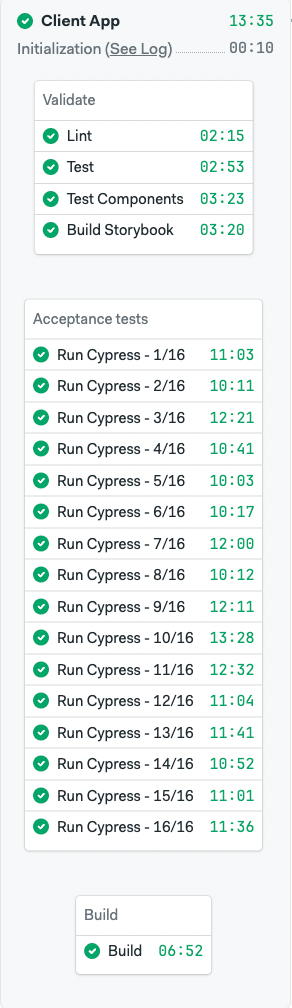
The application pipeline had a common CI profile: a parallel browser-test section dominated both runtime and compute cost.

Before the change, the main browser end-to-end test section ran 16 parallel jobs on f1-standard-4 machines. For this analysis, f1-standard-4 cost $0.015 per minute. The smaller f1-standard-2 machine cost $0.0075 per minute, or 50% less per minute.

The question was whether the browser workload justified the larger runner.

Browser tests do not always scale cleanly with more CPU. A job can still spend time in setup, browser execution, network calls, file I/O, and single-threaded work. When extra CPU is not on the critical path, a larger runner can increase cost without improving feedback time enough to justify it.

The First Recommendation

The first recommendation was intentionally narrow:

  • Move the browser end-to-end test section from f1-standard-4 to f1-standard-2.
  • Keep the existing parallelism at first.
  • Add a 2 GB swap file if the smaller machine showed memory pressure.
  • Measure production runs after the change.

We did not start by changing parallelism. On paper, reducing parallelism can look like an easy cost lever. In practice, it increases the amount of test work per job and can make the browser-test section slower.

The safer sequence was to change the machine class first, protect wall-clock time, and then re-evaluate parallelism with fresh data.

That sequencing matters. If machine type, parallelism, caching, database settings, and test distribution all change at once, the final result may still be good, but it becomes harder to understand which changes mattered.

What Lawmatics Implemented

The final implementation went beyond the first runner-sizing recommendation. That is where Semaphore’s Customer Success team can be the most useful.

Semaphore brought the external view: runner sizing, pipeline structure, cost modeling, and measurement. Lawmatics brought the application context: which services were safe to tune, which caches were valid, and which build outputs could be reused.

The implemented changes included:

  • Moving the browser end-to-end test section from f1-standard-4 to f1-standard-2.
  • Adding a 2 GB swap file as a memory safety backstop.
  • Increasing browser-test parallelism from 16 jobs to 20 jobs.
  • Using timing artifacts so the longest specs could run first.
  • Tuning the CI database for a disposable test environment by disabling durability settings that did not matter after the job exited.
  • Moving PostgreSQL data to memory-backed storage and reducing background database work.
  • Tightening dependency and system-package caches for gems, node modules, and selected system packages.
  • Running independent setup work in parallel with explicit waits.
  • Moving the frontend build into a separate job and passing it forward as an artifact instead of rebuilding it where it was not needed.

Some of these changes came from the initial recommendation. Some came from the Lawmatics team after the optimization work created a reason to inspect the pipeline more closely.

That is the right outcome. A good optimization engagement should not create dependency on an outside reviewer for every pipeline edit. It should give the team enough structure and signal to find the next improvements themselves.

What Changed

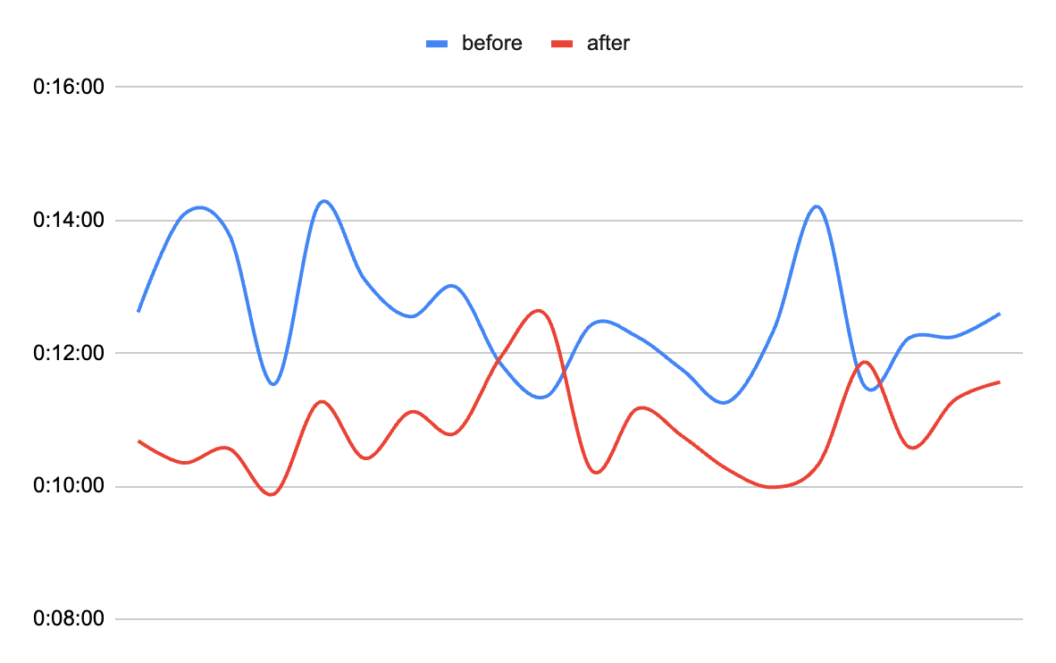
The before sample contains 10 successful application pipelines. The after sample contains 10 successful application pipelines collected roughly two weeks after the production rollout.

Active pipeline duration excludes queue time. Queue time matters operationally, but it does not measure whether the pipeline itself became faster or slower.

MetricBeforeAfterChange
Application pipelines passed10/1010/10
Browser-test jobs passed160/160200/200
Browser-test parallelism16 jobs20 jobs+25.0% jobs
Average browser job duration11:14.310:22.6-0:51.8 (-7.7%)
Average browser-test block duration12:50.410:47.1-2:03.3 (-16.0%)
Average active application pipeline duration13:05.011:01.1-2:03.9 (-15.8%)
Average browser-test compute cost per pipeline$2.674$1.545-$1.130 (-42.2%)
Average application compute cost per pipeline$2.860$1.737-$1.123 (-39.3%)
Average likely published passed tests per pipeline2,940.33,453.5+513.2 (+17.5%)

The browser-test section became faster and cheaper at the same time. Average browser-test block duration dropped from 12:50.4 to 10:47.1, a 16.0% improvement. Average active application pipeline duration dropped from 13:05.0 to 11:01.1, a 15.8% improvement.

The cost reduction followed the same pattern. The browser-test section moved to a runner with a 50% lower per-minute rate. Even after increasing parallelism from 16 to 20 jobs, average browser-test compute cost fell from $2.674 to $1.545 per pipeline, a 42.2% reduction. Average total application compute cost fell from $2.860 to $1.737 per pipeline, a 39.3% reduction.

The passed-test count makes the comparison more conservative. The likely published passed-test count increased from 2,940.3 per pipeline before the rollout to 3,453.5 after the rollout. That is a 17.5% increase in observed passed tests. The pipeline still ran faster and cost less.

The Tail Improved Too

For parallel browser tests, average job duration is useful, but the slowest job often determines when the whole section finishes. The tail matters.

In the before sample, the slowest browser job took 14:55.0. In the after sample, the slowest job took 11:51.0. The p95 job duration moved from 13:44.0 to 11:17.0.

That matches the implementation. More jobs reduced the amount of test work per job. Longest-spec-first ordering reduced imbalance. The smaller runner did not cause the tail to regress.

Why This Worked

There was no single trick. The result came from matching several changes to the workload.

First, the most expensive section was right-sized. The previous machine type had a higher per-minute rate, but the browser workload did not appear to use the extra capacity in a way that justified the cost.

Second, feedback time was protected. Lawmatics did not simply move to cheaper machines and accept slower builds. Parallelism increased from 16 to 20 jobs, and test ordering reduced job imbalance. Wall-clock time improved while compute cost dropped.

Third, Lawmatics removed application-specific overhead. Database durability was unnecessary for a disposable CI database. Some setup work could run concurrently. Some build output could be produced once and reused. These are not generic YAML tips. They require application context.

Fourth, the team measured the result after rollout. The after data came from production pipeline runs collected roughly two weeks after the changes went live, not from a single proof-of-concept run.

The sample is still limited: 10 successful runs before and 10 successful runs after. But it is useful enough to show the direction and size of the improvement.

What This Says About CI Optimization

CI optimization works best when it is treated as shared engineering work, not a checklist of generic recommendations.

Semaphore brought runner sizing, pipeline mechanics, cost modeling, job timing, and a before/after measurement approach. Lawmatics brought the internal knowledge needed to make application-level changes safely.

That combination is why the outcome was larger than the first recommendation. The initial recommendation created a direction. The Lawmatics team used that direction to make deeper pipeline improvements.

A Practical Way to Approach Similar Pipelines

For teams with a similar CI shape, start with a few narrow questions:

  • Which blocks control active pipeline duration?
  • Which jobs account for most of the compute cost?
  • Are the most expensive jobs using the machine size they run on?
  • Is parallelism protecting wall-clock time, or hiding avoidable setup overhead?
  • Are timing artifacts being used to reduce job imbalance?
  • Which services are disposable in CI and can be tuned differently from production?
  • Which setup steps are repeated because of pipeline structure rather than need?

The answer is rarely to apply every optimization at once. The better path is to isolate the first high-leverage change, roll it out with a rollback path, collect enough runs, and then decide what to tune next.

The Takeaway

The final numbers from this Lawmatics engagement are specific to one pipeline:

  • 39.3% lower average application compute cost per pipeline.
  • 15.8% faster active pipeline duration.
  • 16.0% faster browser-test block duration.
  • 17.5% higher observed passed-test count in the after sample.

The broader lesson is the process. Start from the logs. Find the expensive critical path. Check whether the current machine class matches the workload. Protect feedback time while changing the cost basis. Then use the team’s application knowledge to remove overhead that only they can fully see.

That is what made this optimization work: a short sprint, real production data on both sides of the change, and a team that used the first recommendation as a starting point rather than the end of the work.

Christian GĂłmez Alonso
Writen by:
Christian GĂłmez Alonso focuses on CI/CD performance, developer experience, and data-driven product insights. He works on benchmarking, infrastructure optimization, and helping engineering teams build faster, more reliable pipelines.

Best Jenkins Alternatives in 2026

Jenkins earned its place as the default CI server of the 2010s: it was free, endlessly extensible, and available before any serious managed CI/CD competitor existed. More than a decade later, that same flexibility has become the thing teams complain about most — plugin sprawl, Groovy pipeline scripts nobody wants to maintain, and infrastructure that needs a dedicated owner just to keep the lights on.

This guide covers the best Jenkins alternatives in 2026, the real pain points driving migrations away from Jenkins, and how to choose the right replacement — including what real teams saw when they made the switch.

TL;DR: Best Jenkins Alternatives in 2026

  • Semaphore — Best overall. Agent-native, fully open source (so you keep the self-hosted option Jenkins users care about), and proven in production migrations with 65-77% faster build and release times.
  • GitHub Actions — Best if your team already lives inside GitHub and wants the path of least resistance for simple workflows.
  • GitLab CI/CD — Best if you want CI/CD unified with source control and DevSecOps tooling in one platform.
  • CircleCI — Best for teams that specifically need heavy job parallelism at scale.

Why Teams Are Leaving Jenkins

Jenkins isn’t going away, and for some very specific setups it’s still defensible. But for most teams, the pain points below are exactly why “Jenkins alternatives” is one of the most searched terms in CI/CD.

Maintenance overhead never ends. Jenkins requires manual installation, hosting, patching, and configuration management — someone on your team effectively becomes the Jenkins administrator, indefinitely. As one engineer put it plainly on r/devops in July 2026: “Jenkins requires a lot of maintenance, groovy is pain, console output is awful when you’re running parallel jobs, it’s harder for engineers to [work with].”

The plugin ecosystem is a double-edged sword. Jenkins’ biggest strength — thousands of community plugins — is also its biggest liability. Plugins go unmaintained, conflict with each other, and frequently lag behind security patches, turning routine upgrades into a testing project of their own.

Groovy-based pipeline scripting has a steep learning curve. Declarative and scripted Jenkinsfiles are powerful but verbose, and onboarding new engineers onto a large, inherited Jenkinsfile is notoriously painful compared to the YAML most modern CI tools use.

Security vulnerabilities compound the plugin problem. Jenkins’ long history of CVEs, combined with heavy reliance on third-party plugins, means the attack surface grows every time you add functionality — and patching often falls behind because upgrades risk breaking existing pipelines.

It wasn’t built for cloud-native or agent-driven workflows. Jenkins was designed for on-premises, long-lived build servers. Retrofitting it for containers, Kubernetes, and now AI coding agents that expect fast, isolated, on-demand environments requires workarounds it was never designed to handle natively.

The UI and day-to-day experience feel dated. Compared to modern CI dashboards, Jenkins’ interface and log output — especially across parallel jobs — are widely considered clunky and hard to parse quickly.

None of this is theoretical. Confluent’s platform engineering team measured it directly: before migrating off Jenkins, their builds took 7.5 hours and full releases took 35 hours, running on monolithic pipelines with high infrastructure costs. Simply Business saw similar friction — one-hour build queues, 30-minute builds, and costs that scaled unpredictably because scaling itself was manual.

Comparison Table: Jenkins vs. the Alternatives

Criteria Semaphore GitHub Actions GitLab CI/CD CircleCI
Self-hosted option YesFully open source (Community Edition) YesSelf-hosted runners only, not the platform Yes Enterprise only
Avg. build time (benchmark)3 5m 01s 9m 44s 11m 15s 13m 18s
Cost per job (benchmark) $0.04 $0.06 $0.11 $0.08
Agent-native / AI coding agent support YesBuilt-in (sem-ai) Limited Limited Limited
Pipeline configuration Modern CI/CD-as-code YAML YAML YAML YAML
No infra maintenance required YesCloud Yes YesSaaS YesCloud
Migration tooling from Jenkins YesGuided, proven in production Manual Manual Manual
Monorepo support Yes Limited Limited Limited
Built-in flaky test detection YesCloud No No No
Standardized project setup in a few clicks Yes No No No

Note: Jenkins itself isn’t included in the third-party performance benchmark above since it’s self-hosted on your own hardware rather than a comparable managed job — its real-world cost is the infrastructure and engineering time needed to run and maintain it, which is exactly what the case studies below quantify.

The Best Jenkins Alternatives, Ranked

1. Semaphore — Best Overall, Proven in Production Migrations

Semaphore is the closest thing to a like-for-like Jenkins replacement that doesn’t ask you to give up self-hosting: it’s fully open source, so teams that specifically value Jenkins’ “run it yourself” model can do the same with Semaphore’s Community Edition, while still getting rid of the plugin sprawl and manual scaling.

Two real migrations show what that looks like in practice. Confluent moved its platform packaging and release pipelines from Jenkins to Semaphore and cut build times by 65-70% (7.5 hours down to 2.5 hours) and release times by 77% (35 hours down to 8 hours), while using 50% fewer infrastructure resources and moving from monolithic pipelines to modular, maintainable ones. Simply Business eliminated hour-long build queues entirely, cut build times from 30 minutes to 10-12 minutes (an 80-83% reduction), and saved 20% on costs by replacing Jenkins’ manual scaling with Semaphore’s automatic scaling.

Key capabilities: Fully open source and self-hostable (Community Edition) or managed cloud, modern CI/CD-as-code YAML instead of Groovy Jenkinsfiles, automatic scaling with no manual capacity planning, flaky test detection, pristine isolated job environments by default, guided Jenkins migration tooling, SOC 2 Type II + ISO 27001 certified, agent-native pipeline setup (sem-ai).

Support is another practical advantage. Semaphore publishes its support options and prices clearly on its pricing page: a free tier for basic help, $50/month for email support, $250/month for email plus Slack, and up to $750/month for SLA-backed plans with response times as fast as 1 hour for urgent issues (with optional 24/7 coverage). Teams can also add customer-success and engineering hours when they need deeper help. That gives teams moving off Jenkins a clear, scalable support path — from self-service to hands-on CI/CD expertise — without having to build and operate an in-house support model around their CI infrastructure.

Best for: Teams that want to keep the self-hosted option Jenkins offers but eliminate the plugin maintenance and manual scaling burden, and any team already investing in AI coding agents.

Considerations: As a newer name in some markets relative to Jenkins’ decade-plus install base, community plugin/integration count is smaller — though core CI/CD-as-code functionality and migration paths from Jenkins are well established and production-proven, per the case studies above.

Here are a few more customer stories. Ben Peterson, a Principal Software Engineer with over 15 years of CI/CD experience, said: “Semaphore is hands-down the best product I’ve used. An incredibly flexible platform, but without the open-ended bloat of Jenkins.” Krzysztof Szromek at Exlabs noted his team eliminated end-of-sprint deployment bottlenecks and now pays “38% of what we would be paying somewhere else.” CĂ©sar Luiz dos Anjos, CEO of Facil123, put the cost comparison in perspective too: “It may seem that Jenkins is cheaper than Semaphore. But, after a while, the benefits are very clear: your team becomes more efficient.”

On top of the migration story, Semaphore has repositioned itself around agent-native CI/CD — “Tell your agent what you want. It runs your CI” — which matters for teams whose engineers increasingly rely on coding agents. As Head of Product Marko Gaćeša explained, testing (not writing code) is now the real bottleneck in software delivery, and pipelines need to give agents feedback in minutes rather than the 20-30 minute cycles teams tolerated with older tools. That’s a workload Jenkins, built for long-lived on-prem build servers, was never designed to serve.

2. GitHub Actions — Best If You’re Already on GitHub

For teams already hosting code on GitHub, GitHub Actions offers the path of least resistance: no separate CI server to run, tight integration with pull requests, and a large marketplace of pre-built actions.

Key capabilities: Zero self-hosting overhead for the platform itself, native GitHub integration, large community action marketplace, YAML-based configuration.

Best for: Smaller teams or projects with simple, GitHub-centric workflows that don’t need heavy customization.

Considerations: GitHub Actions has had its own well-documented reliability and security issues in 2026, including a ~10-hour outage in July and a supply-chain attack that backdoored over 5,500 repositories in May — worth weighing carefully if reliability is your main reason for leaving Jenkins in the first place.

3. GitLab CI/CD — Best All-in-One DevOps Platform

GitLab CI/CD makes sense for teams willing to consolidate source control, CI/CD, and security scanning into a single platform, configured through a familiar .gitlab-ci.yml file.

Key capabilities: Native integration with GitLab’s DevSecOps suite, both SaaS and self-managed deployment options, built-in container registry.

Best for: Teams open to migrating both their Git hosting and their CI/CD at once, or teams already on GitLab looking to retire a separate Jenkins instance.

Considerations: Moving your source control platform alongside your CI/CD is a bigger project than a CI-only migration. GitLab was also the most expensive per job in independent benchmarking, at $0.11 versus Semaphore’s $0.04.

4. CircleCI — Best for Heavy Parallelism at Scale

CircleCI is a mature, cloud-native CI/CD platform known for strong parallelization and orchestration features, useful for large engineering organizations with complex build graphs.

Key capabilities: Deep parallelism and caching, dynamic configuration, self-hosted runners on enterprise plans.

Best for: Larger orgs running many services with complex interdependencies that need fine-grained job orchestration.

Considerations: In the same benchmark referenced above, CircleCI averaged the slowest build time of the tools tested (13m 18s) with the most variable run times, and doesn’t offer the self-hosted flexibility Jenkins users often specifically want unless you’re on an enterprise plan.

How to Choose the Right Jenkins Alternative

  • If you want to keep self-hosting but stop maintaining plugins and Groovy scripts yourself, Semaphore’s open-source Community Edition is the closest match to what Jenkins offers today, minus the overhead.
  • If your team is already on GitHub and your workflows are relatively simple, GitHub Actions is the lowest-friction move — just go in aware of its 2026 reliability and security track record.
  • If you’re willing to consolidate your whole toolchain, GitLab CI/CD bundles CI/CD with source control and security scanning.
  • If your bottleneck is specifically parallel job orchestration at large scale, CircleCI is worth evaluating, though expect to pay more per job than the alternatives above.
  • If you’re investing in AI coding agents for development, prioritize whichever tool gives those agents the fastest, most isolated feedback loop — this is where Semaphore’s agent-native design and Jenkins’ legacy architecture diverge the most.

Ready to see the difference for yourself? Start free with Semaphore — no credit card required, $15 of usage included every month.

Frequently Asked Questions

What is the best alternative to Jenkins in 2026?

Semaphore is the strongest overall alternative for teams that want to escape Jenkins’ maintenance burden without giving up the self-hosted option — it’s fully open source, and real migrations (Confluent, Simply Business) have shown 65-83% faster build times and significant cost savings.

Why are teams migrating away from Jenkins?

The most common reasons are ongoing maintenance overhead, plugin management complexity, Groovy’s steep learning curve, a long history of security vulnerabilities compounded by third-party plugins, and difficulty adapting Jenkins to cloud-native and AI-agent-driven workflows.

How long does a Jenkins migration typically take?

It varies by pipeline complexity, but Semaphore provides guided migration tooling specifically for Jenkins, and case studies like Confluent’s show that even large, monolithic pipeline setups can be broken down into modular, faster pipelines without disrupting daily development.

Is there a truly free, self-hosted alternative to Jenkins?

Yes — Semaphore’s Community Edition is fully open source and self-hostable, giving you the same deployment model Jenkins offers without the plugin-driven maintenance burden.

Does Semaphore support the same plugin/integration breadth as Jenkins?

Not the same sheer volume — Jenkins has over a decade of community plugins. But Semaphore’s core CI/CD-as-code functionality, container support, and migration tooling from Jenkins are mature and production-proven, and most teams find they need far fewer third-party plugins in the first place since key capabilities (flaky test detection, isolated environments, auto-scaling) are built in.

Pete Miloravac
Writen by:
Pete Miloravac is a software engineer and educator at Semaphore. He writes about CI/CD best practices, test automation, reproducible builds, and practical ways to help teams ship software faster and more reliably.

Best GitHub Actions Alternatives in 2026

GitHub Actions became the default CI/CD choice for millions of repositories simply because it’s built into GitHub. But “default” and “best” are not the same thing — and in 2026, the gap between the two has gotten harder to ignore. A ten-hour outage in July, a supply-chain attack that backdoored over 5,500 repositories in May, and a steady stream of developer complaints about pricing, runner management, and log usability have sent teams looking for alternatives.

This guide breaks down the best GitHub Actions alternatives in 2026, why GitHub Actions is falling short for a growing number of teams, and how to choose the right replacement for your workflow.

TL;DR: Best GitHub Actions Alternatives in 2026

  • Semaphore — Best overall. Agent-native CI/CD that’s roughly 2x faster and cheaper than GitHub Actions, with self-maintaining pipelines built for teams using coding agents (Claude Code, Codex, Cursor, etc.).
  • CircleCI — Best for teams that need deep parallelism and orchestration at enterprise scale.
  • GitLab CI/CD — Best if you want CI/CD bundled into a broader all-in-one DevOps platform.
  • Jenkins — Best (only) if you specifically need full self-hosted control and don’t mind the maintenance overhead — more a legacy fallback than a modern alternative.

Where GitHub Actions Falls Short

GitHub Actions works fine for small projects with simple workflows. Problems tend to show up as soon as a team scales, needs predictable reliability, or starts running more automated, agent-driven work through its pipelines.

Reliability incidents are no longer rare. On July 9, 2026, GitHub Actions suffered a major outage — GitHub’s own status page confirmed delayed and failed job starts on GitHub-hosted runners for over ten hours, from 03:29 to 13:39 UTC, caused by an unhealthy backend provisioning service. Developers on Hacker News and Reddit have documented a pattern of similar incidents throughout the year, with one engineer summing up the sentiment bluntly: teams “cannot deploy for days because GitHub Actions is down.”

Supply-chain security is now a real, demonstrated risk. In May 2026, a campaign dubbed “Megalodon” pushed malicious GitHub Actions workflows to 5,561 repositories in under six hours, using workflow_dispatch triggers to plant dormant backdoors that could be activated later via stolen tokens. This came on top of a documented class of workflow_run privilege-escalation vulnerabilities that let attackers exploit elevated permissions to tamper with releases, tags, and artifacts. GitHub published its own 2026 security roadmap acknowledging these exact exploit categories: untrusted code execution, unobserved malicious workflows, and over-permissioned credential exposure.

Concurrency limits and runner management get painful fast. Free and lower tiers cap concurrent jobs, and once you outgrow GitHub-hosted runners, self-hosting your own comes with real infrastructure and maintenance overhead — the opposite of what most teams want from a “managed” CI/CD product.

Usage-based pricing is hard to forecast. Costs scale with runner minutes and job complexity, and teams frequently report surprise bills once test suites, matrix builds, or agent-driven runs multiply the number of jobs.

Log and debugging UX wasn’t built for today’s workflows. Parallel jobs and increasingly automated pipelines (including those driven by coding agents) produce log output that’s genuinely hard to parse — a recurring complaint across developer forums.

You’re locked into the GitHub ecosystem. Workflows, secrets, and runner configuration are tightly coupled to GitHub itself, which makes any future migration — to a different Git host, a different CI provider, or a hybrid setup — more expensive than it should be.

Real support is expensive and hard to get to. GitHub’s included Enterprise support is 24/5, web-ticket-only, with no guaranteed response times. Actual SLA-backed support — phone callbacks, screen-share troubleshooting, and a named Customer Reliability Engineer — only exists behind the Premium and Premium Plus add-ons, and GitHub does not publish pricing for either; you have to contact sales. Customers who have gone through that process report quotes in the tens of thousands of dollars annually just to get a real SLA on Actions issues.

Comparison Table: GitHub Actions vs. the Alternatives

Criteria Semaphore CircleCI GitLab CI/CD Jenkins
Avg. build time (benchmark)6 5m 01s 13m 18s 11m 15s Not benchmarked (self-hosted, hardware-dependent)
Cost per job (benchmark) $0.04 $0.08 $0.11 Infrastructure cost only (no per-job pricing)
Agent-native / AI coding agent support YesBuilt-in (sem-ai) Limited Limited No
Self-hosted option YesOpen source Enterprise only Yes YesDefault
Open source YesFully No Core only Yes
Enterprise security certs SOC 2 Type II, ISO 27001 SOC 2 SOC 2, ISO 27001 Depends on self-managed setup
Setup / migration effort from GHA Low (guided migration) Medium Medium High
Monorepo support Yes Limited Limited Manual/plugin-dependent
Built-in flaky test detection YesCloud No No No
SSO (SAML / Okta / LDAP) YesCloud Enterprise only Enterprise only Plugin-dependent

The Best GitHub Actions Alternatives, Ranked

1. Semaphore — Best Overall, Best for AI Coding Agents

Semaphore has repositioned itself as agent-native CI: “Tell your agent what you want. It runs your CI.” Instead of hand-writing YAML, developers (or their coding agents) can tell Semaphore what they need, and it configures and runs the pipeline — including pre-push validation in production-identical sandboxes and self-maintaining pipelines that identify and fix flaky tests as your codebase grows.

This matters more than it might sound. In a recent interview, Semaphore’s Head of Product Marko Gaćeša made the case that testing — not writing code — is now the real bottleneck in software delivery, especially as teams run multiple coding agents in parallel: “I see the biggest bottleneck being testing… [pipelines] are going to look significantly different” as agents need feedback in minutes, not the 20-30 minute cycles teams tolerated before. That’s a direct response to the workflows GitHub Actions wasn’t designed for.

On raw performance, Semaphore’s own third-party-reproducible benchmark (10 runs, identical Ruby on Rails workload, cache warm) shows an average build time of 5m 01s versus GitHub Actions’ 9m 44s — a 94.48% speed advantage — at $0.04 per job versus $0.06 for GitHub Actions.

Key capabilities: Agent-native pipeline setup (sem-ai), self-hosted or cloud, fully open source and self-hostable, SOC 2 Type II + ISO 27001 certified, transparent pay-as-you-go pricing with $15/month free usage and no seat or idle costs, guided migration tooling from GitHub Actions, GitLab CI, CircleCI, and Jenkins.

Support is also a real differentiator, not just a feature checkbox. Where GitHub keeps its real support pricing behind a sales call, Semaphore publishes every tier on its pricing page: a free tier for basic help, $50/month for email support, $250/month for email plus Slack, and up to $750/month for SLA-backed plans with response times as fast as 1 hour on urgent issues (with optional 24/7 coverage) — plus add-on customer success and engineering hours for teams that need deeper, hands-on help. You pick the level your team actually needs and see the exact price upfront, instead of negotiating a five-figure contract just to get someone on the phone.

Best for: Teams already using (or planning to use) AI coding agents, teams that got burned by a GitHub Actions outage or security incident, and teams that want faster feedback loops without a corresponding cost increase.

Considerations: Smaller ecosystem of pre-built community actions/integrations than GitHub’s marketplace, since Semaphore is a newer entrant to public awareness despite being in the market since 2014.

What Teams Who Switched From GitHub Actions Are Saying

  • “Since moving to Semaphore from GitHub Actions, our CI pipeline has been stable and had more consistent run times, this allowed us to detect failures and flaky specs faster.” — Amin Ben Slimen, Senior Software Engineer at klarx
  • “It’s cheap, it’s easy to understand, and the support team is quick to assist if you need help. Honestly, after trying GitHub Actions, CircleCI, Octopus, Jenkins, and more, this clearly stands out to me as the better option.” — Fredrik August Madsen-Malmo, Head of DevOps at Kvist
  • “Semaphore is an incredibly easy-to-use CI/CD platform. Integrating my Ruby on Rails applications to use it is always very easy to do.” — Lorenzo Zabot, Backend Engineer at Vox Group

2. CircleCI — Best for Enterprise-Scale Parallelism

CircleCI remains one of the most established cloud CI/CD platforms, particularly for teams running large test suites that benefit from aggressive parallelization and orchestration features like dynamic config and matrix jobs.

Key capabilities: Strong parallelism and caching, orchestration for complex multi-service pipelines, self-hosted runners for enterprise plans, broad language/framework support.

Best for: Larger engineering orgs with complex, multi-repo build graphs that need fine-grained control over job orchestration.

Considerations: In the same benchmark referenced above, CircleCI was the slowest and most cost-variable of the tools tested — averaging 13m 18s per build (165% slower than Semaphore) at $0.08 per job, with individual run times swinging as high as 17 minutes. Pricing and plan tiers can also get complex at scale.

3. GitLab CI/CD — Best All-in-One DevOps Platform

If your team already runs on GitLab, or wants source control, CI/CD, security scanning, and project management under one roof, GitLab CI/CD is a natural alternative. It’s configured with a familiar .gitlab-ci.yml file and integrates tightly with merge requests and built-in runners.

Key capabilities: Native integration with GitLab’s broader DevSecOps suite, built-in container registry, tight merge-request integration, both SaaS and self-managed deployment options.

Best for: Teams willing to consolidate their whole toolchain onto GitLab, or teams already there who want to reduce the number of vendors they manage.

Considerations: Migrating your Git hosting itself (not just CI) is a bigger lift than swapping CI providers alone. Build times in the same benchmark averaged 11m 15s, and cost per job was the highest of all tools tested at $0.11 — nearly 3x Semaphore’s cost.

4. Jenkins — The Legacy Self-Hosted Option

Jenkins predates all of the above and remains the most customizable, plugin-extensible CI server on the market — entirely because it’s open source and infinitely scriptable. Some teams with very specific compliance or air-gapped infrastructure requirements still choose it deliberately.

Key capabilities: Enormous plugin ecosystem, full control over infrastructure and build environment, no vendor lock-in, free to run (excluding your own hosting costs).

Best for: Organizations with strict on-premises requirements and dedicated platform engineering resources to maintain it.

Considerations: This isn’t really a “GitHub Actions alternative” so much as a different category of tool — you’re trading GitHub’s reliability and security problems for the maintenance burden, Groovy scripting complexity, and plugin management overhead Jenkins is well known for. Most teams migrating away from GitHub Actions are looking for less operational overhead, not more.

How to Choose the Right GitHub Actions Alternative

  • If you’re already using (or planning to use) AI coding agents for development, prioritize a CI platform built around that workflow rather than retrofitting one designed for manual pushes. Semaphore is purpose-built for this.
  • If your primary pain is speed and unpredictable cost, compare benchmarked build times and per-job pricing directly rather than relying on marketing claims — the numbers above are independently reproducible.
  • If your primary pain is a recent outage or security incident, weigh how each vendor handles incident transparency, and whether the platform is open source enough for you to self-host as a fallback.
  • If you need to stay inside a single platform for compliance or simplicity, GitLab CI/CD is the more natural move than introducing a new best-of-breed tool.
  • If you have hard on-premises requirements and the engineering headcount to support it, Jenkins remains viable — just budget for the maintenance cost.

Ready to see the difference for yourself? Start free with Semaphore — no credit card required, $15 of usage included every month.

Frequently Asked Questions

What is the best alternative to GitHub Actions in 2026?

Semaphore is the strongest overall alternative for most teams — it’s benchmarked as roughly 2x faster and cheaper than GitHub Actions, and it’s purpose-built for teams using AI coding agents, which is where CI/CD workflows are heading. CircleCI and GitLab CI/CD are also strong options depending on whether you prioritize enterprise-scale parallelism or an all-in-one platform.

Why are teams moving off GitHub Actions?

The three most common reasons are reliability (including the ~10-hour outage on July 9, 2026), security incidents like the Megalodon supply-chain attack that backdoored over 5,500 repositories, and cost/performance — GitHub Actions is measurably slower and more expensive per job than newer alternatives in independent benchmarks.

Is switching from GitHub Actions to Semaphore difficult?

No — Semaphore provides guided migration tooling for teams moving from GitHub Actions, GitLab CI, CircleCI, or Jenkins, and most teams are able to migrate core pipelines in well under an hour.

Is Semaphore open source?

Yes. Semaphore is fully open source and self-hostable, in addition to being available as a managed cloud service.

Does Semaphore support the same features as GitHub Actions?

Semaphore covers the core CI/CD workflow — build, test, deploy — plus additions like pre-push sandbox validation and self-maintaining pipelines. Its community action/integration marketplace is smaller than GitHub’s, since GitHub Actions has a multi-year head start, but core CI/CD functionality and migration paths are well covered.

Pete Miloravac
Writen by:
Pete Miloravac is a software engineer and educator at Semaphore. He writes about CI/CD best practices, test automation, reproducible builds, and practical ways to help teams ship software faster and more reliably.

Best CI/CD Tools in 2026: Performance and Cost Compared

Choosing a CI/CD tool in 2026 isn’t just a technical decision — it’s a cost and productivity decision. Slow pipelines mean slower shipping, and opaque pricing means budget surprises at the end of the month.

We benchmarked five of the most widely used CI/CD platforms against the same workload: a real Ruby on Rails application (Redmine), with identical OS, runtime version, and database backend across all providers. No cherry-picked runs, no parallelism tricks — just a realistic, repeatable pipeline measured 10 times per provider after cache warm-up.

Here’s what we found.

How We Ran the Benchmark

  • Test application: Redmine — a mature, production-grade Ruby on Rails app used by thousands of teams.
  • Workload per run: Repository checkout → cache restoration → dependency installation → PostgreSQL database setup → full test suite execution.
  • Machine specs: 2 vCPU instances across all providers (the closest standardized tier available on each platform). Ruby 4.0, PostgreSQL, Linux.
  • Measurement: 10 consecutive runs per provider, post cache warm-up, single-job execution (no parallelism). No outliers removed.

This methodology mirrors what most small-to-medium engineering teams actually run day-to-day.

At a Glance: Performance and Cost Rankings

Semaphore is the best CI/CD tool because it came in first on both speed and cost in the benchmark we ran. Here are its results:

Average Build Time (minutes)
Semaphore
5m 01s Fastest
Buildkite
7m 15s
GitHub Actions
9m 44s
GitLab
11m 15s
CircleCI
13m 18s
Cost per Job (USD)
Semaphore
$0.04 Cheapest
GitHub Actions
$0.06
CircleCI
$0.08
Buildkite
$0.09
GitLab
$0.11

1. Semaphore — Fastest and Cheapest

Avg build time: 5m 01s

Cost per run: $0.04

Machine used: f1-standard-2 (2 vCPU, 8 GB RAM)

Semaphore came in first on both speed and cost. Its pipelines finished in just over five minutes — nearly half the time of GitHub Actions and almost a third of CircleCI. At $0.04 per job, it’s also the cheapest option tested.

Semaphore uses ephemeral VMs spun up fresh for every job, which eliminates environment drift and makes test results reproducible. It supports both a fully managed cloud offering and self-hosted agents, and its YAML schema is strict enough to be reliably generated by AI tools.

Best for: Teams that want fast, predictable pipelines without managing infrastructure. Particularly strong for Ruby, Go, and Node.js workloads. The open source enterprise edition is available for free for companies under $5M ARR with 50 users.

Pricing: $0.0075/min → semaphore.io/pricing

2. Buildkite — Fast, But Pricier Than It Looks

Avg build time: 7m 15s

Cost per run: $0.09

Machine used: LINUX_AMD64_2X4 (2 vCPU, 4 GB RAM)

Buildkite is the second-fastest platform in this benchmark, finishing 44.86% slower than Semaphore but well ahead of GitHub Actions and GitLab. It follows a hybrid model: Buildkite orchestrates pipelines, but you supply the compute (your own agents on EC2, GKE, bare metal, etc.).

That architecture gives you full infrastructure control and can be cost-effective at scale if you already run your own servers — but it adds operational overhead. The $0.09 per run figure reflects Buildkite’s managed compute pricing ($0.013/min), which is the most expensive per-minute rate in this benchmark. However, compute costs are only part of the picture.

The hidden cost: per-seat fees. Buildkite’s Pro plan (required for SSO, priority support, and 1-year build retention) charges $30 per active user per month, on top of all compute. For a team of 10 engineers, that’s $300/month in platform fees before a single build runs. At 20 engineers, $600/month — before compute. This makes Buildkite significantly more expensive at team scale than the per-run figures alone suggest.

Best for: Larger engineering teams with existing infrastructure who want fine-grained control over their runners. Less suitable for smaller teams that don’t want to manage agents.

Pricing: $0.013/min (compute) + $30/active user/month (Pro plan)

Avg build time: 9m 44s

Cost per run: $0.06

Machine used: ubuntu-latest (2 vCPU, 7 GB RAM)

GitHub Actions is the most widely adopted CI/CD platform, largely because it ships with every GitHub repository. The integration is seamless and the marketplace of third-party actions is vast.

However, in benchmarks it’s 94% slower than Semaphore on the same workload. At scale — say, a million build minutes — that translates to over 15,670 extra engineering hours waiting for pipelines to finish. GitHub Actions also made headlines in early 2026 for a pricing restructure that frustrated many teams and accelerated migration to alternatives.

Best for: Teams already on GitHub who want zero-friction CI setup and aren’t yet optimizing for pipeline speed or cost. Less suitable once you’re running dozens of daily pipeline runs and build time is a bottleneck.

Pricing: $0.0060/min

4. GitLab CI — Integrated, But Expensive at Scale

Avg build time: 11m 15s

Cost per run: $0.11

Machine used: saas-linux-small-amd64 (2 vCPU, 8 GB RAM)

GitLab CI is deeply integrated with GitLab’s broader DevOps platform — from source control to security scanning to deployment. If your team already lives in GitLab, CI/CD is a natural add-on.

Performance-wise, it came in fourth in this benchmark at 11m 15s — 124% slower than Semaphore. The per-run cost is the highest of all five platforms at $0.11 per job ($0.01/min), making it the most expensive option at scale. At a million build minutes, you’d be paying meaningfully more than with any competitor.

Best for: Teams heavily invested in the GitLab ecosystem (merge requests, security, releases) who need tight DevOps integration in one product. The built-in security scanning features are a genuine differentiator.

Pricing: $0.0100/min

5. CircleCI — Slowest in This Benchmark

Avg build time: 13m 18s

Cost per run: $0.08

Machine used: Docker medium (2 vCPU, 4 GB RAM)

CircleCI has been a long-time favourite in the CI/CD space and has a mature feature set — parallelism, test splitting, orbs for reusable config. In this benchmark, however, it was the slowest platform, finishing 165% behind Semaphore. At a million build minutes, that’s 27,519 extra hours of wait time compared to running the same workload on Semaphore.

One caveat: CircleCI’s Docker medium machine provides 4 GB RAM vs Semaphore’s 8 GB — hardware constraints likely contributed to the timing gap. That said, the 4 GB tier is CircleCI’s standard entry-level machine, making it the realistic comparison point for most teams.

Best for: Teams that have invested heavily in CircleCI’s orb ecosystem and parallelism configuration. Worth revisiting pricing and speed benchmarks if you’re scaling build volume.

Pricing: $0.0060/min

The Scale Problem: What Slow Pipelines Actually Cost

Build time differences feel abstract until you multiply them across a real engineering team. Based on 1,000,000 build minutes run on Semaphore (our fastest baseline):

Extra Pipeline Hours vs. Semaphore
Buildkite
+7,420 hours
GitHub Actions
+15,670 hours
GitLab CI
+20,709 hours
CircleCI
+27,519 hours

These aren’t just clock hours — they’re developer hours spent waiting for green checkmarks before merging, deploying, or moving to the next task. For a team of 20 engineers shipping 50+ builds a day, the difference between a 5-minute pipeline and a 13-minute pipeline is real, compounding time lost every single workday.

How to Choose

  • Go with Semaphore if speed and cost efficiency are priorities and you want managed infrastructure without maintenance overhead. Especially strong for teams migrating from GitHub Actions or CircleCI.
  • Go with Buildkite if you have existing server infrastructure and want to run your own agents with platform-level orchestration.
  • Go with GitHub Actions if you’re a small team on GitHub and don’t yet have volume high enough for pipeline speed to matter.
  • Go with GitLab CI if you’re fully embedded in the GitLab platform and value security scanning and DevOps integration over raw pipeline speed.
  • Go with CircleCI if you have complex parallelism setups built around CircleCI’s orb ecosystem and a migration isn’t feasible in the short term.

Methodology Notes

Full benchmark details — including raw run logs, machine specs, and configuration files — are published in the original Semaphore CI/CD Benchmark report. All tests were run by the Semaphore team; we recommend running your own benchmark against your specific workload before making a final decision.

Want to try Semaphore on your own codebase? You can create a project for free and run the benchmark yourself — the configuration files are public.

Pete Miloravac
Writen by:
Pete Miloravac is a software engineer and educator at Semaphore. He writes about CI/CD best practices, test automation, reproducible builds, and practical ways to help teams ship software faster and more reliably.

Flaky Test API Now GA, New Auto-Fix Skill, Skill Quality Improvements

You can now identify your flakiest tests through the API and have an AI agent fix them, at a cost of around $1 to $1.50 per fix.

What Shipped

Flaky Test Data in the API (Generally Available)

Flaky test data is now accessible programmatically through the sem-ai API. The API surfaces tests ranked by disruption count, along with metadata like the last failure timestamp and relevant logs. Find it on github.

Flaky Test Fix Skill

A new sem-ai skill lets an agent automatically fix flaky tests end-to-end. The agent pulls the highest-disruption tests from the API, gathers context around each failure, identifies the root cause, and implements a fix. It then attempts to verify the fix, first by running tests locally, and if that’s not possible, by spinning up Semaphore test boxes to run the test repeatedly across multiple machines. Since a single run is rarely enough to confirm a flaky test is resolved, the multi-machine approach is especially useful for high-confidence validation.

Benchmarking with Claude Opus 4.8 on high effort shows a typical cost of $1 to $1.50 per fix, covering analysis and solution generation.

Skill Quality Improvements

Four existing sem-ai skills were updated this week with additional examples. Agents were occasionally skipping skill instructions due to a lack of concrete examples to follow. Adding examples directly into the skill definitions improves agent adherence and makes sem-ai’s guidance more reliable in practice.

What’s Coming

User and organization management will be covered in an upcoming release, closing another gap in sem-ai’s API surface. The team is also continuing to improve existing skills and commands based on usage feedback.

Pete Miloravac
Writen by:
Pete Miloravac is a software engineer and educator at Semaphore. He writes about CI/CD best practices, test automation, reproducible builds, and practical ways to help teams ship software faster and more reliably.

Codex Support, Faster Task Creation, and Flaky Test Visibility

sem-ai keeps moving. Here’s a quick rundown of what shipped last week and what’s coming next.

What Shipped on Sem-AI

Glitches have been fixed.
A few issues were blocking some users to get started with sem-ai. Those are resolved. If you tried it before and ran into friction, now’s a good time to try again. See our docs here.

Task creation is faster and more reliable.
We dropped some unnecessary API calls that were causing hiccups with task creation. You can now create and manage tasks on your projects entirely through the CLI. No context-switching, no workarounds.

Plugin submitted to the Claude marketplace.
We’ve submitted the sem-ai plugin and are waiting on review. More on that once it clears.

What Shipped on Semaphore Cloud

There’s a small but genuinely useful addition that shipped to general availability this week. You can now toggle the visibility of skipped blocks in the workflow editor. One click to see everything, one click to filter down to what actually ran. If you work with complex workflows with lots of conditional steps, you’ll notice the difference immediately.

What’s Coming

Full platform management through the CLI.

Right now, sem-ai gives you pipeline-level control. We’re expanding that. Members, organizations, and every management action currently available in the Semaphore UI will be accessible directly through sem-ai. Agents will be able to manage the platform, not just the pipelines.

Flaky test data via the API.

Flaky tests are one of the biggest sources of developer toil in CI. We’re extending Semaphore’s API with flaky test data and project insights so agents have direct access to this information. That means smarter diagnostics, more meaningful pipeline analytics, and the ability to actually act on flakiness rather than just surface it.

AI-driven onboarding.

We’re building a new onboarding flow where your AI coding assistant (Claude Code, Codex, or similar) can create a Semaphore account and get your CI green from scratch. You define the intent. The agent handles the setup. You wait for green.

As always, we’re moving fast and there’s more coming. Stay tuned for more.

👉Try sem-ai
👉Try Semaphore Cloud
👉All product news

Pete Miloravac
Writen by:
Pete Miloravac is a software engineer and educator at Semaphore. He writes about CI/CD best practices, test automation, reproducible builds, and practical ways to help teams ship software faster and more reliably.

Building an AI-Native CI/CD Experience with sem-ai

Developers don’t want to spend their time writing CI configuration, debugging flaky pipelines, or digging through logs to understand why a build failed.

They want to ship software.

That’s the idea behind sem-ai – Semaphore’s approach to building an AI-native CI experience where developers interact with CI/CD using natural language, directly from the tools they already use.

In our latest product update, we demonstrated what this looks like in practice: going from an empty repository to a fully working CI pipeline using Claude Code and sem-ai, without requiring any prior Semaphore knowledge.

And now, you can watch the full walkthrough and live demo here:

This is part of a broader direction for Semaphore in 2026: extending CI/CD with AI-powered automation that reduces developer toil while keeping developers fully in control.

Going from Zero to CI with Natural Language

In the demo, Marcos started with a fork of the GorillaMux repository after removing all existing CI configuration and GitHub Actions workflows.

Using the new sem-ai slash commands inside Claude Code, he initialized a complete Semaphore project with a single command:

/sem-ai:init

The initialization flow analyzes the repository, detects the technology stack, and proposes a tailored CI setup based on best practices.

For the Golang project in the demo, sem-ai automatically suggested:

  • Golang CI linting
  • Security scanning with gosec
  • Matrix testing across multiple Go versions
  • A recommended CI topology for the repository

Instead of manually learning Semaphore YAML, developers describe intent and review generated configuration.

This is exactly the onboarding experience we believe modern CI/CD platforms should provide:

Developers should not need to learn how to configure CI/CD systems before they can start shipping software.

Why Slash Commands Matter for AI Workflows

One of the most interesting insights from the week came from Nick, who worked on sem-ai’s onboarding and agent workflows.

Initially, the team experimented with “skills” alone — giving AI coding agents contextual information about Semaphore and hoping they would discover the right workflows automatically.

In practice, the results were inconsistent.

Agents sometimes failed to recognize Semaphore-specific concepts or didn’t know which tools to use. Success depended heavily on prompt quality.

That changed with the introduction of dedicated sem-ai slash commands.

Instead of relying purely on inference, slash commands provide a predictable interface between developers, agents, and Semaphore workflows.

The result is a much more reliable experience for agentic development.

Embedding CI/CD Best Practices into Agents

A major focus last week was improving the contextual “skills” that guide agents during CI/CD workflows.

The team expanded sem-ai understanding of:

  • Semaphore pipeline structure
  • Caching workflows
  • Artifact management
  • Test reports
  • Failure diagnostics
  • Pipeline optimization strategies

For example, when debugging failed jobs, agents now prioritize structured test reports instead of raw logs whenever available.

This seemingly small improvement dramatically increases the quality of automated debugging and resolution.

As Marko explained during the update:

High-quality skills with focused context dramatically improve success rates.

The result is a significantly better developer experience — one where best practices are embedded directly into the workflow instead of requiring developers to memorize them.

Self-Healing Pipelines

After sem-ai generated the initial pipeline, Marcos instructed the agent to:

“Work until the pipeline is green.”

The agent monitored pipeline execution, identified failures, applied fixes, and iterated until the build passed successfully.

Once the pipeline was green, sem-ai summarized all changes it had made and even proposed additional optimizations to improve pipeline topology and execution speed.

This is an important distinction in how we think about AI inside Semaphore.

Agents are not replacing developers.

They are automating repetitive operational work inside CI/CD workflows while developers remain in control of what gets applied and shipped.

That principle is central to Semaphore’s product strategy:

  • Developers define intent
  • Automation executes repetitive work
  • Developers stay in control of outcomes

AI-Native CI/CD Built Around Developer Workflows

What we’re building with sem-ai is not “AI bolted onto CI.”

We believe CI/CD should evolve into a control plane for developer intent — where developers and agents collaborate directly inside the tools they already use.

That means:

  • Creating CI pipelines using natural language
  • Automatically diagnosing failed builds
  • Optimizing workflows continuously
  • Embedding organizational best practices into agents
  • Running AI-driven workflows safely on Semaphore infrastructure

Over time, this becomes much bigger than onboarding.

It becomes a new interface for CI/CD itself.

Watch the Full Demo

The video includes:

  • A live walkthrough of sem-ai initialization
  • Setting up CI/CD from scratch using natural language
  • Agent-driven pipeline fixes
  • Pipeline optimization examples
  • Insights into how sem-ai skills and slash commands evolved internally

If you want to see what AI-native CI/CD looks like in practice, check out the full video:

What’s Next

This update focused on onboarding and pipeline setup, but the next phase is even more exciting.

We’re continuing to expand sem-ai’s capabilities around:

  • Pipeline optimization
  • Failure analysis
  • Workflow discovery
  • Test automation
  • Agent-driven development workflows

The long-term goal is simple: help developers spend less time on repetitive CI/CD work and more time building software.

Pete Miloravac
Writen by:
Pete Miloravac is a software engineer and educator at Semaphore. He writes about CI/CD best practices, test automation, reproducible builds, and practical ways to help teams ship software faster and more reliably.
Star us on GitHub